Native advertising has quietly become one of the most efficient ways to get in front of the right audience without interrupting their experience. Done well, your ads look and feel like the surrounding content while still driving measurable business results. In this guide, you’ll learn exactly how to create a successful Native Advertising Campaigns—from picking the right formats and platforms to building creatives, targeting, and optimization. Think of this as a practical playbook you can hand to your team and execute.
Done poorly? They blend in so much that nobody clicks, or they feel clickbaity and tank your brand.
Quick Overview: How to Create a Successful Native Advertising Campaign
If you just need the high-level process, here is the blueprint:
- Define a single, clear campaign goal and KPIs.
- Build a sharp target audience profile.
- Choose the right platforms and native ad formats.
- Create the content asset your native ads will promote.
- Craft native creatives (headlines, images, CTAs) that feel like content.
- Set up targeting, budget, bids, and tracking correctly.
- Launch, test systematically, and optimize for scale.
The rest of this guide walks through each step in detail, with templates and examples you can copy.
What Is Native Advertising, Really?
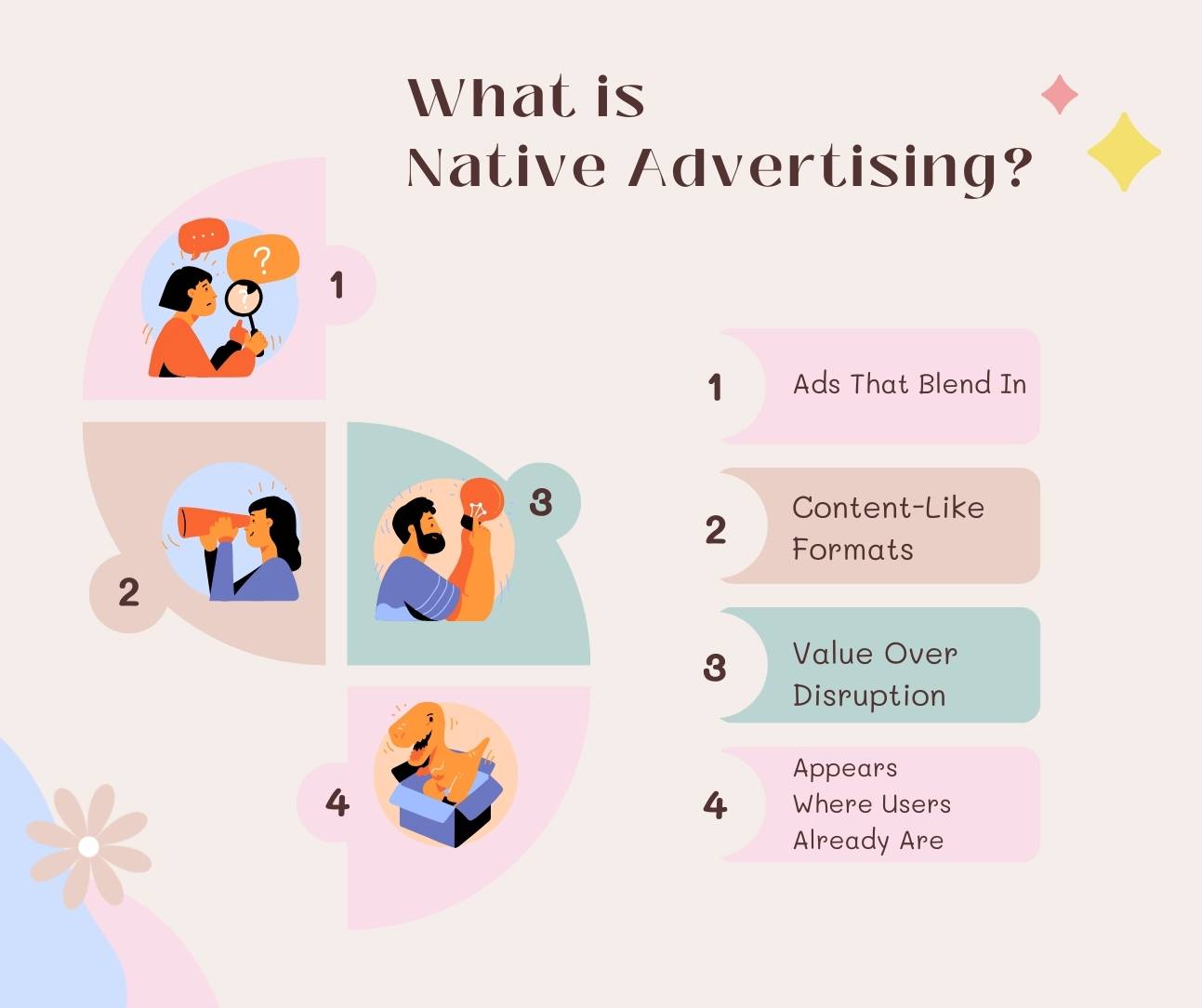
Native advertising is paid media that’s designed to match the look, feel, and function of the platform where it appears.
Instead of banner ads screaming for attention, native ads:
- Blend into news feeds, article lists, or content recommendations
- Use formats similar to editorial content (headlines, thumbnails, short blurbs)
- Prioritize value and relevance, not just a direct sales pitch
You’ve seen them as:
- “Sponsored” or “Promoted” stories on news websites
- “Recommended for you” articles at the bottom of posts
- In-feed ads on social platforms that look like normal posts
The magic of native advertising is that it meets users where they already are, consuming content on their terms.
Related – Expanding Reach Through Lookalike Audiences
Why Native Advertising Works (When It’s Done Right)
A successful native ad campaign can deliver:
- Higher engagement: Native units often outperform display banners on CTR and time-on-site because they don’t feel like interruptions.
- Better content consumption: People are more likely to read an article or watch a video that looks like editorial content than a hard-sell ad.
- Stronger trust: When native ads match the platform’s tone and style, they feel more like helpful suggestions than pushy promotions.
- Full-funnel impact: From awareness (articles, videos, reports) to lead gen (webinars, ebooks) and conversions (case studies, offers), native can support multiple stages.
The catch: relevance and quality matter more than in almost any other channel. That’s why we start with strategy, not just “launch ads and see.”
Native Ad Formats You Should Know (and When to Use Them)
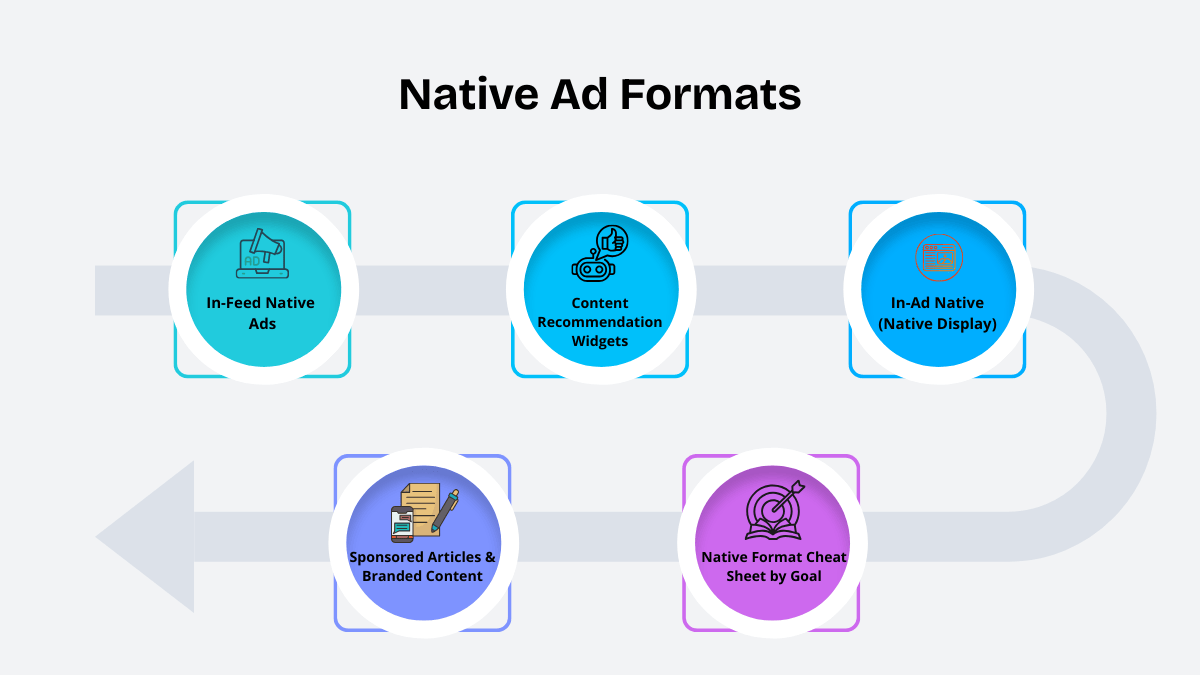
Before we build campaigns, you need to know what you’re working with. The main native advertising formats are:
1. In-Feed Native Ads
These appear inside a platform’s content feed (news feeds, social feeds, homepages).
Best for:
- Driving traffic to articles, guides, or listicles
- Promoting video or editorial-style content
- Mid-funnel education and nurturing
Example use case:
A B2B SaaS company promoting a “State of [Industry]” report in a news feed targeting decision-makers.
2. Content Recommendation Widgets
These show up as “Recommended for you” or “You may also like” blocks at the end or side of articles.
Best for:
- Top-of-funnel awareness
- Getting cold audiences to discover your brand through content
- Massive reach across publisher networks
Example use case:
A D2C skincare brand promoting “7 Skincare Habits Dermatologists Swear By” through Outbrain/Taboola placements across lifestyle blogs.
3. In-Ad Native (Native Display)
These are native-style ads placed inside display inventory (image + headline + description + logo).
Best for:
- Performance campaigns that need more reach
- Mixing brand awareness with measurable conversions
- Retargeting and lookalike campaigns
Example use case:
An ecommerce brand retargeting visitors with native display units showing their best-selling products.
4. Sponsored Articles / Branded Content
Longer editorial content hosted on publishers’ sites, often co-created with the publisher.
Best for:
- High-intent education and storytelling
- Brand lift and authority-building
- Complex products or categories
Simple Format Selection Cheat Sheet
|
Goal |
Recommended Native Formats |
|
Brand awareness |
In-feed + content recommendations |
|
Traffic & engagement |
In-feed + in-ad native |
|
Lead generation |
In-feed → gated reports, webinars, checklists |
|
Retargeting / sales |
In-ad native + recommendation widgets |
Now that you know the “what,” let’s build the “how.”
Must See – Why Responsive Ads are successful
Step 1: Define a Single Clear Goal (and How You’ll Measure It)
The fastest way to kill a native campaign is to expect it to do everything at once.
Choose one primary objective:
- Awareness – show your content to as many qualified people as possible
- Traffic & engagement – drive high-quality visits to content
- Lead generation – get email sign-ups, demo requests, trial signups
- Revenue – drive direct purchases or signups
Then attach specific metrics:
- Awareness → impressions, viewable impressions, scroll depth, time on page
- Traffic → CTR, bounce rate, pages/session, avg. session duration
- Lead gen → number of leads, CPL, conversion rate
- Revenue → number of purchases, CPA, ROAS
Make your goal concrete:
- “Generate 300+ MQLs in 60 days at ≤ $7 CPL from native ads.”
- “Increase branded search volume by 20% in 90 days using native top-of-funnel content.”
Quick checklist
- One primary goal
- 1–2 secondary metrics
- Goal documented in your campaign brief
- Goal reflected in campaign naming conventions
Step 2: Build a Sharp Target Audience Profile
Native ads work when they look like they were written for one person.
Create a simple audience document for each persona:
Who they are
- Role, industry, company size (for B2B)
- Demographics and life stage (for B2C)
- Geography and language
What they want
- Top 3 pains
- Top 3 desired outcomes
- Common objections (“It’s too expensive”, “Too complex”, “Won’t work for us”)
Where they spend time online
- Specific sites and categories they read
- Newsletters, apps, YouTube channels, communities
Example persona (agency media buyer):
“Performance marketer at a digital agency, managing 5–6 clients, frustrated with rising CPCs and banner blindness. Wants reliable channels and creative angles that bring results quickly.”
Turn this into real targeting:
- Contextual: advertising, marketing, business, entrepreneurship, technology
- Interests/behaviors: online advertising, media buying, digital marketing tools
- Custom audiences:
- Customer lists
- Website visitors
- People who engaged with specific landing pages
- Customer lists
Quick checklist
- 1–3 personas documented
- At least 3 pains & 3 desires for each persona
- Mapped to actual targeting options in your chosen platforms
Step 3: Choose the Right Platforms & Native Ad Formats
Now we match your persona and goal to platforms and formats.
Example mapping
B2B SaaS
- Platforms: LinkedIn, premium business publishers, native networks with business sections
- Formats: in-feed ads, sponsored articles
D2C / Ecommerce
- Platforms: lifestyle and news publishers, native networks, social feeds
- Formats: content recommendations, in-feed, in-ad native
Agencies / Affiliate marketers
- Platforms: broad publisher networks, marketing/finance categories
- Formats: in-feed + recommendation widgets + native display
Quick checklist
- 1–2 primary formats selected
- 1–3 platforms chosen based on where your persona actually hangs out
- Exclusion list prepared (e.g., no political or controversial sites)
Check Out – Proven Paid Advertising Strategies for Real Estate Agents
Step 4: Create the Content Asset Your Native Ads Will Promote
Native advertising is content-led. Your ads exist to get people to a valuable content asset.
Pick one core asset based on your goal:
Awareness/engagement
- Deep guides (“How to…”), industry reports, video explainers, interviews
Lead generation
- Gated ebooks, templates, checklists, webinars, calculators
Revenue/sales
- Case studies, comparison pages, product breakdowns, and limited-time offers
Make the angle specific, not generic
Don’t promote “Our ultimate guide to native advertising.” Everyone does that.
Instead, sharpen the angle:
- “How SaaS Brands Cut CPA by 30% Using Native Advertising Funnels”
- “7 Native Ad Funnels D2C Brands Use to Turn Readers into Repeat Buyers”
- “How Agencies Spy on Competitors’ Native Ads and Turn Insights into Profit”
Structure your content for conversions
A high-performing content asset usually has:
- Promise – headline and subheadline that clearly state the value
- Context – show you understand the reader’s situation
- Framework – clear steps or a model they can follow
- Proof – examples, screenshots, stats, or mini case studies
- Next step – soft CTA aligned with the original promise (demo, checklist, tool, trial)
Quick checklist
- One primary content asset per campaign
- Asset has a clear, specific promise
- Landing page loads fast and is mobile-friendly
- One primary CTA that matches the ad’s promise
Step 5: Craft Native Ad Creatives That Feel Like Content
Your native creatives should blend in visually but stand out conceptually.
5.1. High-performing headline formulas
Aim for 40–70 characters. Lead with a benefit, not your brand name.
Use these templates:
How [Audience] Can [Result] Without [Pain]
- “How Media Buyers Scale Native Ads Without Burning Budget”
[Number] [Thing] That [Outcome]
- “9 Native Ad Angles That Consistently Print Leads”
We Analyzed [Number] [Thing]. Here’s What Worked
- “We Studied 423 Native Ads. These 7 Kept Winning.”
[Warning/Secret]: [Counterintuitive Truth]
- “The Native Ad Mistake That Quietly Kills Your ROI”
Create at least 10 headline variations across different angles: pain-driven, outcome-driven, curiosity, proof.
5.2. Images that match the platform
Good native ad images:
- Focus on a single clear subject
- Look like editorial content, not a glossy banner
- Avoid cheesy stock poses
- Fit well in square and landscape crops
- Align with the tone of the publisher (serious vs casual vs lifestyle)
Create 3–5 images per campaign to test.
5.3. Description & CTA that connect the dots
Descriptions should:
- Clarify what the reader will get
- Call out who it’s for
- Set the right expectation for the landing page
Examples:
- “Free 12-page playbook for performance marketers who want cheaper, more scalable native traffic.”
- “See real campaign examples and funnels used by brands in your niche.”
CTAs should be specific:
- “See the playbook”
- “S.teal these funnels”
- “Watch the full breakdown”.
Quick checklist
- 10+ headline variations
- 3–5 distinct images
- 2–3 description variants
- CTAs aligned with the content asset, not just generic “Learn more”
Step 6: Set Up Targeting, Budget, Bids & Tracking
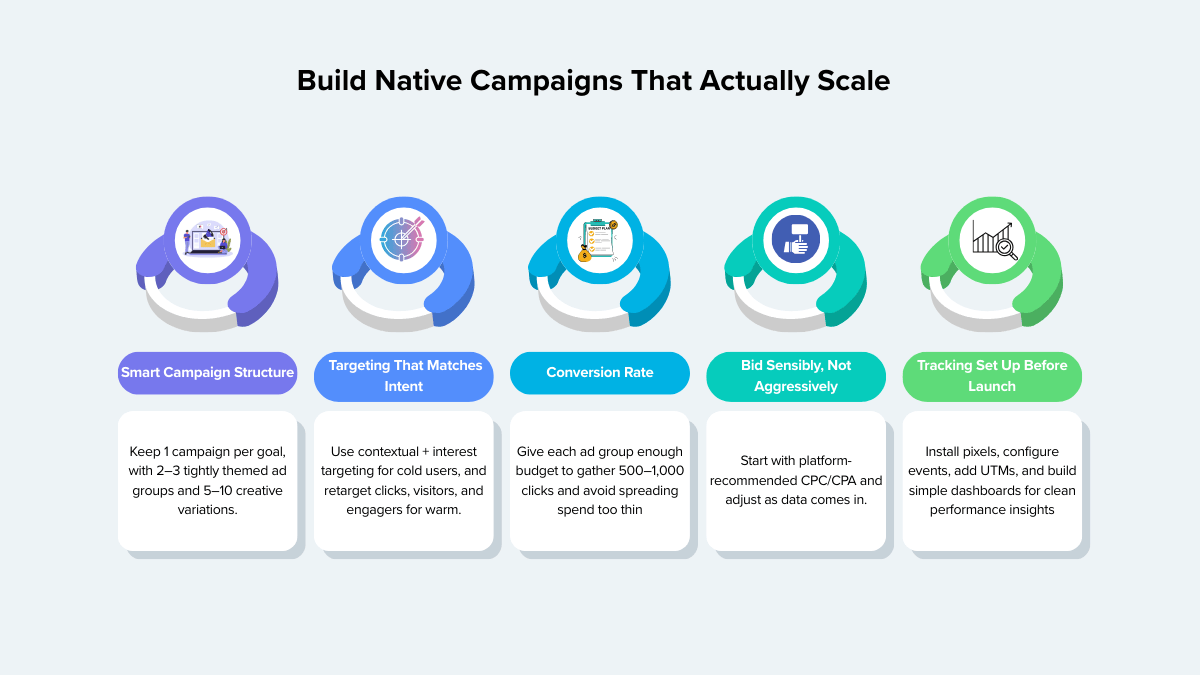
Set Up Targeting, Budget, Bids & Tracking
This is where many campaigns fail—not because of bad ideas, but because the setup doesn’t let them succeed.
6.1. Campaign structure
Use a simple, scalable setup:
1 campaign per main goal
- Example: NAW_LeadGen_Q1_SaaS
2–3 ad groups per campaign, split by:
- Persona (SaaS marketers, agencies, ecommerce)
- Or funnel stage (cold, warm, hot)
Inside each ad group:
- One primary landing page/content asset
- 5–10 ad variations (headline + image pairs)
6.2. Targeting strategy
Cold audiences:
- Contextual categories related to your product and content
- Interest/behavior targeting that matches your persona
- Device and placement rules (e.g., mobile-only if your landing page is mobile-optimized)
Warm audiences:
- Website visitors (last 30–90 days)
- Engaged content viewers (video views, article readers if trackable)
- Users who clicked native ads but didn’t convert
Lookalikes / similar audiences:
- Seed from converters (leads, customers), not just all visitors
6.3. Budget and bidding
- Start with enough daily budget so each ad group can reach at least 500–1,000 clicks over the first test period.
- Use the platform’s suggested CPC/CPA as a starting point, not a ceiling.
- Avoid spreading your budget across too many micro ad groups.
6.4. Tracking & analytics (non-negotiable)
Before you launch:
- Platform pixel/tag installed
- Conversion events configured (form submit, trial signup, purchase, etc.)
- UTMs added to all native ads
- Simple dashboards created:
- Performance by platform, placement, device
- Performance by the audience
- Performance by angle (ad naming should reflect this)
- Performance by platform, placement, device
Step 7: Launch, Test, Optimize & Scale
Once your campaign is live, your job is to listen to the data and iterate.
7.1. First 7–10 days: let the campaign breathe (with guardrails)
- Check that impressions and clicks are coming from the right geos and placements.
- Watch CTR, CPC, and early conversion signals.
- Confirm tracking is working (test conversions yourself).
Avoid rebuilding everything in the first 48 hours unless something is obviously broken.
7.2. A simple, repeatable testing sequence
Follow this order:
Headlines first
- Keep image and audience constant
- Run 3–5 headlines
- Pause clear underperformers once they have enough impressions
Images
- Keep top 1–2 headlines
- Test 3–5 different images
Audiences
- Take your best-performing ad combo
- Duplicate into new ad groups with different contextual/interest setups
Landing page/offer
- Adjust above-the-fold copy, CTAs, layouts, or form length
- Keep traffic quality comparable while testing
7.3. Practical optimization rules
You can literally paste rules like this into your playbook:
Pause ads when:
- CTR is ~50% below ad group average after 1,000+ impressions
- CPC is 50% above ad group average
- They spend 2–3× your target CPL/CPA without conversions
Scale ads/audiences when:
- CPL/CPA is consistently better than your target
- Performance is stable for 7–14 days
- You have room to increase budget without killing efficiency
Fix campaigns when:
- CTR is good, but no conversions → likely a landing page or offer problem
- CTR is poor → creative or angle problem
- High bounce rate → mismatch between ad promise and page content
7.4. Document learnings
Every 2–4 weeks, create a short learning summary:
- Winning angles and headlines
- Best-performing audiences and placements
- Best-performing landing pages
- Things that clearly didn’t work
This becomes the starting point for your next native campaign, so you never start from zero.
Also See – Top 15 YouTube Advertising Campaigns
Real-World Style Native Advertising Campaigns Examples
To make this concrete, here are three scenarios:
1: B2B SaaS (Lead Generation)
- Goal: Generate 200 demo requests at ≤ $80 CPL
- Format: In-feed ads on business publishers
- Asset: “Playbook: How SaaS Brands Cut Acquisition Costs with Native Advertising Funnels” (gated)
- Flow: In-feed → playbook landing page → thank-you page with demo CTA → nurture email sequence
2: D2C Brand (Awareness + Sales)
- Goal: Increase new customer orders by 15% in 90 days
- Format: Content recommendation widgets + in-ad native
- Asset: “7 Skincare Habits Dermatologists Swear By” article with embedded product recommendations
- Flow: Recommendation widgets → article → product pages → retargeting with native display ads
3: Agency / Affiliate (Client Acquisition)
- Goal: Acquire 30 new strategy call bookings from agency owners
- Format: In-feed native on marketing and business publications
- Asset: “We Analyzed 327 Native Campaigns. Here’s the Strategy Our Best Clients Use.”
- Flow: In-feed → in-depth case study/guide → booking page for strategy call
- Using AdSpyder to Plan and Optimize Native Campaigns
Here’s where you can soft-sell your product in a valuable way.
You don’t have to guess which angles or creatives will work. With a tool like AdSpyder, you can:
- Discover top-performing native ads in your niche and see which platforms and placements they use.
- Analyze competitors’ creatives—headlines, images, CTAs, and landing pages.
- Spot winning patterns in angles (pain, benefit, urgency, curiosity) and formats.
- Monitor changes over time so you know which campaigns are being scaled vs. killed.
A simple workflow:
- Search your niche/keywords inside AdSpyder.
- Save standout ads and landing pages into a swipe file.
- Map patterns (headline style, imagery, offer type, funnel structure).
- Use these insights to inform your own Step 4 and Step 5.
You’re not copying; you’re using the market as a real-time research lab.
FAQs About Creating Successful Native Advertising Campaigns
How long does it take for a native advertising campaign to work?
Typically, you should give a new native campaign 2–4 weeks of structured testing. The first 7–10 days are about collecting data and understanding benchmarks. After that, you optimize creatives, audiences, and landing pages based on performance.
What is a good CTR for native ads?
Benchmarks vary by industry and platform, but as a rough guide:
- If your CTR is far below the platform’s average, you likely have a creative or audience mismatch.
- Focus less on chasing a specific CTR number and more on the quality of traffic (engagement, conversion rate, CPL/CPA).
Should my native ads sell directly or just promote content?
In most cases, especially for cold traffic, native ads work best when they:
- Promote valuable content first (educational, entertaining, or insightful).
- Use that content to bridge into your product or offer with a relevant, timely CTA.
Direct-response native ads can still work—especially for retargeting and very transactional offers—but they’re usually not the best first touch.
How much budget do I need for a native ad campaign?
Work backwards from your goals and typical CPC/CPA:
- Ensure each ad group can gather at least 500–1,000 clicks during your test period.
- If your average CPC is $0.50–$1.00, you’re looking at $250–$1,000+ per ad group for a meaningful test.
- It’s better to run fewer, well-funded ad groups than many tiny ones.
What’s the biggest mistake marketers make with native ads?
The biggest mistakes are:
- Treating native ads like banner ads—aggressive, flashy, and off-tone for the platform.
- Sending users to a generic homepage instead of a tailored content asset.
- Not setting up proper tracking, so they can’t tell what’s actually working.
Successful native advertising feels like useful content that happens to be sponsored, not a disconnected sales pitch.
Final Thoughts on Native Advertising Campaigns
Creating a successful native advertising campaign is not about finding a “magic” platform or hack. It’s about:
- Being clear about what you want to achieve
- Understanding exactly who you’re talking to
- Matching the right formats and platforms
- Promoting genuinely valuable content
- Testing creatives and audiences with discipline
- Letting data guide your optimization decisions
If you combine this step-by-step playbook with competitive insights from tools like AdSpyder, you’re no longer guessing—you’re building campaigns on top of what’s already working in your market.