Quick Answer
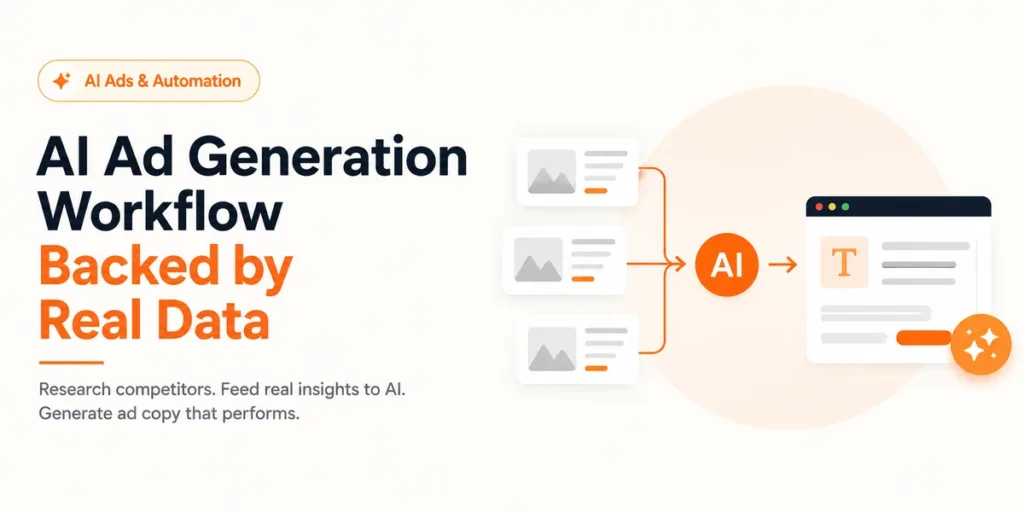
Pull 15–20 competitor ads from AdSpyder’s Ad Library, extract the hook pattern, offer mechanic, emotional trigger, and CTA verb from each, then feed those as a structured context block into AdSpyder’s Text Ad Generation. You’re not copying ads — you’re encoding what the market has already validated as prompt context, so your AI starts with competitive intelligence, not a blank slate.
Most marketers who use AI to write ads treat the prompt like a blank order form. They type a product name, a vague audience description, and a tone request — then wonder why the output sounds like it has never seen an actual ad before.
The problem isn’t the AI. Generic input produces generic output. Your competitors have spent real budget testing what makes your audience stop, click, and convert. That signal is sitting in their live ads right now — visible, searchable, and structured enough to extract in 15 minutes.
This is a technical-creative workflow. By the end you’ll have a repeatable five-step process, a prompt template, and a data-backed answer to a question most AI-first teams get wrong: should you research before you generate, or after? AdSpyder’s own platform data has a clear, contrarian answer — and it should change how you sequence your entire ad creation workflow.
85.6%
skip research entirely
of text-ad generators ran zero competitor searches before first AI draft
675
avg. competitor ads reviewed
by the 14% who did research before generating
64%
same-day search + generate
of generation sessions included a competitor search on the same calendar day
400M+
ads indexed
across 10 platforms — the competitive context behind every prompt
AdSpyder platform data, May 2026. Telemetry window: Aug 2023 – May 2026.
88,000+ competitor-ad searches. 2,000+ AI text ads generated. One platform.
Research what’s already working in your market — then generate smarter first drafts.
In This Guide
The Research-First Problem: AdSpyder’s Own Users Get This Wrong
There is a specific number from AdSpyder’s platform data that should change how you sequence your AI ad workflow.
Across two years of usage (Aug 2023 – May 2026), 1,286 AdSpyder users generated a text ad using the platform’s AI generation feature. Of those, 85.6% had run zero Ad Library searches before their first generation. They opened the generator, typed a prompt, and expected market-ready output — with no market data attached.
Here’s the more important breakdown. Only 346 users (26.9%) never searched competitor ads at all. A much larger group — 755 users, or 58.7% — generated first and then searched. They used competitor research as a sanity check after the draft, not as input before it.
That ordering difference is the entire point of this blog. Research done after a draft catches what’s wrong. Research done before shapes what gets written. Same information, completely different function.
| User behaviour | Users (n) | Share | What this means |
|---|---|---|---|
| Generated first, searched after | 755 | 58.7% | Using research to critique, not to create |
| Never searched at all | 346 | 26.9% | Generating with zero market context |
| Searched 1–5 times before generating | 102 | 7.9% | Light research before generating |
| Searched 6–20 times before generating | 54 | 4.2% | Moderate research before generating |
| Searched 21+ times before generating | 29 | 2.3% | Deep research before generating |
Source: AdSpyder platform data, May 2026. Base: 1,286 users who generated a text ad. Telemetry window Aug 2023 – May 2026.
The 64% same-session signal
On days when a user generated a text ad, 64% of those calendar days also included at least one Ad Library search by the same user. So competitor research is happening — it’s just happening after the first draft in the vast majority of cases. Front-loading that research is the single highest-leverage change to this workflow.
One Finding That Changes the Advice: Image Ad Creators Do This Differently
The 85.6% stat above applies to text ad generators. Image ad generators behave in almost the opposite pattern — and that contrast is the most instructive data point in this blog.
Of the 171 users who generated an image ad on AdSpyder, 62% had already searched the Ad Library before their first image generation. Only 19.3% skipped research entirely. Compare that to text ads, where 85.6% skip research. The direction reverses completely.
Text Ad Generators
85.6%
skip research before first generation
Image Ad Generators
62%
had already searched before generating
The likely reason: image production has a higher perceived cost. When you’re about to invest time in a visual asset, you want to know what’s already in market before you start. Text feels cheaper to iterate — so people generate first and refine later.
The argument for text-ad creators is exactly the same logic applied to copy: front-loading research costs 15 minutes and improves the quality of your first draft. The cost of skipping it shows up in revision rounds, approval friction, and test cycles that could have been avoided.
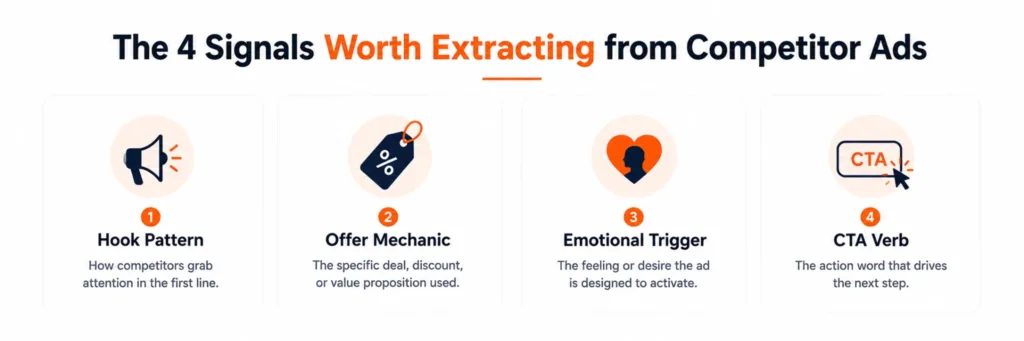
The 4 Signals Worth Extracting from Competitor Ads
Not everything in a competitor’s ad is worth encoding into your prompt. Brand names, specific pricing, and proprietary claims are noise. What you’re extracting are the structural patterns that work independently of the brand — the skeleton of the ad, not its skin.
These four signal types consistently improve AI output quality when included as prompt context:
① Hook Pattern
The structural formula the opening line uses: question, stat shock, negative contrast, bold claim, direct command, or problem-first. This is the most transferable signal — it tells you what your audience is already conditioned to respond to on that platform.
② Offer Mechanic
How the value is packaged: free trial, money-back guarantee, limited seats, feature-first, outcome-first, comparison anchor, or bonus. If three competitors lead with a free trial and your prompt doesn’t mention yours, you’re already behind on offer parity.
③ Emotional Trigger
The primary emotion being activated: fear of missing out, aspiration, frustration relief, social proof, or urgency. If the category runs on anxiety copy and you prompt for “confident and friendly” tone, your ad will feel off-market — even if the copy is technically good.
④ CTA Verb
The action word your category uses: “Get”, “Start”, “Try”, “Book”, “See”, “Claim”, “Join”. Each carries a different friction signal. “Book a call” = high intent. “See how it works” = low friction. Mismatching this to your funnel stage costs clicks.
How many is enough?
You don’t need to extract all four from every ad. Scan 15–20 ads, and when the same hook pattern appears in 12 of them, that pattern is your market’s baseline. Your AI output needs to at least match that baseline before it can beat it. The 14% of AdSpyder users who research before generating review roughly 675 ads in aggregate — enough to spot patterns, not enough to drown in them.
The 5-Step Workflow: Competitor Ad to AI-Generated Draft
Pull 15–20 competitor ads from AdSpyder’s Ad Library
Open AdSpyder Ad Library and search by your primary keyword — not your brand name, your target keyword. Apply your target platform filter first. Sort by “Most Recent” so you’re working from live market data, not 2026 archive copy.
Aim for 5–8 different advertisers, not 20 ads from one competitor. One advertiser running 20 variants tells you about their testing cadence, not about market patterns. You need breadth to spot frequency.
Classify each ad across the 4 signal types
For each ad, note: (1) hook pattern, (2) offer mechanic, (3) emotional trigger, (4) CTA verb. A plain text list works. You’re building a frequency map — which hook type appears most across the set? Which CTA verb dominates?
When you see the same combination — say, “question hook + free trial + urgency + Get CTA” — appearing in 8 of 20 ads, that’s the category’s default script. Your AI prompt needs to know about it whether you’re matching it or deliberately breaking from it.
Write a competitor context block — not a creative brief
A creative brief tells the AI what you want your ad to say. A competitor context block tells the AI what the market already looks like. These are different inputs and they produce different outputs.
The context block is 4–6 lines. It names the dominant patterns, flags what’s over-indexed in the category (so you can differentiate), and identifies the one gap no competitor’s ad currently fills. See the exact template in the next section.
Feed the context block into AdSpyder’s Text Ad Generation
In AdSpyder’s Text Ad Generation, paste your context block before your core product description. The generator uses it as conditioning — producing copy that’s aware of the competitive landscape, not just your product attributes.
Request at least 3 variants: one that matches the category’s dominant hook pattern, one that breaks from it, and one that leads with your differentiation gap. You need contrast to judge quality at all.
Validate each variant against the competitor benchmark
Before any variant goes to test, hold it against your frequency map. Does the hook pattern match or deliberately exceed the category baseline? Is the offer mechanic competitive? Does the CTA verb match the funnel stage you’re targeting?
This isn’t about copying what competitors do — it’s about not accidentally writing below the market’s quality floor. An ad that fails the benchmark on all four signals goes back to the generator with tighter context.
The scale behind this workflow
AdSpyder users have run 88,000+ competitor-ad searches, generated 139,000+ keyword suggestions, and set up 8,600+ active tracking projects since launch. The research infrastructure is already there. The gap is connecting it to the generation step before the first draft, not after. (AdSpyder platform data, May 2026)
The Competitor Context Block: Exact Template and How to Fill It
Here is the structure. The yellow-highlighted fields are what you fill in after your competitor research. The instruction to the AI goes at the end — after the context, not before it.
Competitor Context Block — paste before your product description
MARKET CONTEXT (do not copy — use as AI conditioning):
Dominant hook pattern in this category:
[e.g. “Question hook — ‘Are you still paying for X without Y?'” or “Stat-shock — ‘Most teams waste 6 hrs/week on this'”]
Most common offer mechanic:
[e.g. “Free trial — 12 of 20 competitor ads lead with this; nobody uses a money-back guarantee angle”]
Primary emotional trigger used:
[e.g. “Frustration relief — competitors focus on time wasted on manual work, not on aspiration”]
Dominant CTA verb:
[e.g. “‘Start’ or ‘Get’ dominate — low-friction entry language is the norm in this category”]
Gap no competitor addresses:
[e.g. “None mention platform-specific coverage — every ad is generic ‘all ads in one place’, no one claims YouTube or LinkedIn specifically”]
Instruction to AI (goes after context, not before):
Write 3 Google Search ad variants for [PRODUCT] targeting [AUDIENCE].
Variant 1: match the dominant pattern above (benchmark).
Variant 2: keep the same offer mechanic but break the hook pattern.
Variant 3: lead with the gap no competitor addresses (differentiation).
Format: 3 headlines (max 30 chars each), 2 descriptions (max 90 chars each) per variant.
Critical: never paste raw competitor copy
Never put actual competitor ad text into the context block. You’re passing structural patterns, not creative text. Structural patterns are market intelligence. Raw copy is a reproduction risk. “Question hook” is a pattern. “Are you tired of paying for ads that don’t work?” is someone else’s copy.
Which Platform Should You Spy on First?
Match your research platform to your target platform. Cross-platform research adds noise more than signal — Facebook copy patterns are structurally different from Google search patterns, and conflating them weakens your context block.
Here’s how AdSpyder users distribute their competitor research — which tells you where the pattern signal is most concentrated:
| Platform | Share of searches | Best signal to extract | Best for |
|---|---|---|---|
| Google Search | 50% | CTA verb + offer mechanic | Intent-led copy, keyword-aligned hooks, best starting point for any campaign |
| Facebook / Meta | 22% | Hook pattern + emotional trigger | Scroll-stop copy, emotional angle, visual-copy relationship |
| YouTube | 15% | Offer mechanic + social proof signals | Long-form narrative structure, credibility framing |
| 2.7% | Audience-specific hook + CTA verb | B2B positioning, job-function targeting language, long-copy norms | |
| Bing + others | ~9% | Offer mechanic confirmation | Cross-validation of Google search patterns |
Source: AdSpyder Ad Library search distribution, AdSpyder platform data May 2026.
Google’s 50% share is not just because it’s the biggest platform. Search copy is the most structurally readable — every element has a defined slot (headline, description, CTA). Patterns are easier to isolate and extract. If you’re running mixed-platform campaigns and need to start somewhere, start with Google.
For B2B campaigns, the LinkedIn Ad Library on AdSpyder gives you audience-segment language and long-copy norms that no other platform’s data can provide. The context block you build from LinkedIn research will look structurally different — and that difference matters for B2B prompts.
Generic Prompting vs Competitor-Trained Prompting: What Actually Changes
This isn’t a marginal quality improvement. The output type changes, not just the output quality. Here’s how the three main prompting approaches compare in practice:
| Workflow | What the AI knows | Output type | Main risk |
|---|---|---|---|
| Generic prompt “Write a Google ad for [product]” |
Your product attributes only | Polished but generic — could be for any brand in any category | Below-market quality floor; multiple revision rounds |
| Manual competitor review + generic prompt Informal research, then standard prompt |
Your product + scattered observations in your head, not in the prompt | Slightly better instinct — but research never entered the prompt | Research investment is wasted; output doesn’t reflect what you learned |
| AdSpyder research + competitor context block Structured patterns extracted, then fed as context |
Your product + the market’s current baseline + the gap you can own | Market-aware copy — positioned against real competition from the first draft | Takes 15 extra minutes upfront; pays back across every revision cycle |
The middle row is the most common failure mode: marketers who do the research but don’t encode it into the prompt. The research investment disappears at the prompt boundary.
4 Mistakes That Waste Your Competitor Research
Researching only one competitor
One advertiser’s pattern tells you about their strategy, not the market. You need 5–8 advertisers to identify a frequency pattern. Researching only the category leader means you’re building context around a single brand voice, not a market signal.
Feeding copy instead of structure
Pasting three competitor headlines into a prompt asks for a remix. Describing the structural pattern (“stat-shock hook, free-trial offer, ‘Start’ CTA”) gives the AI market intelligence. One produces derivative copy; the other produces market-aware copy.
Using outdated ads as research material
An ad pulled 18 months ago was pulled for a reason. Sort by recency first. AdSpyder’s URL and Domain Analysis shows currently active ads per advertiser domain — the filter that keeps your context block current, not historical.
Cross-platform research for single-platform campaigns
Facebook copy patterns don’t transfer cleanly to Google search. If you’re generating Google ads, research Google. The patterns differ enough that cross-platform context adds noise to your prompt rather than signal. Match the research surface to the target surface.
Pre-Prompt Checklist — Before You Open the Generator
Run through this before every AI ad generation session. It takes 2 minutes and replaces 2 hours of revision:
✓
Searched 15–20 competitor ads across 5+ advertisers on the target platform (not your own brand)
✓
Identified the dominant hook pattern across at least 8 of those ads
✓
Mapped the most common offer mechanic and CTA verb across the competitive set
✓
Identified the primary emotional trigger dominating the category
✓
Found at least one positioning gap no competitor’s ad currently fills
✓
Written a competitor context block using structural patterns — no raw competitor copy in the prompt
✓
Requested 3 variants: one matching the baseline, one breaking it, one leading with the differentiation gap
✓
Validated each output variant against the frequency map before any variant goes to test
Frequently Asked Questions
AdSpyder Ad Library + Text Ad Generation
400M+ competitor ads. One AI generation workflow.
Search what competitors are running across Google, Facebook, YouTube, LinkedIn, and 6 more platforms — then feed those patterns as structured context into your next AI ad draft. The research and generation live in the same platform.
23,000+ users · 10 platforms · 400M+ ads indexed · No credit card required