Quick answer:
- For website forms: HubSpot Forms, Typeform, and Jotform are strong options depending on whether you prioritize CRM integration, conversational UX, or flexible form building.
- For chat-based capture: Intercom and Pipedrive LeadBooster are better suited to qualifying visitors while they are actively browsing.
- For phone leads: CallRail and Invoca add call attribution and conversation intelligence instead of treating every incoming call as identical.
- For campaign landing pages: Unbounce combines dedicated pages with built-in lead forms.
- For paid ads: LinkedIn Lead Gen Forms and Google lead forms reduce the number of steps between an ad click and submission.
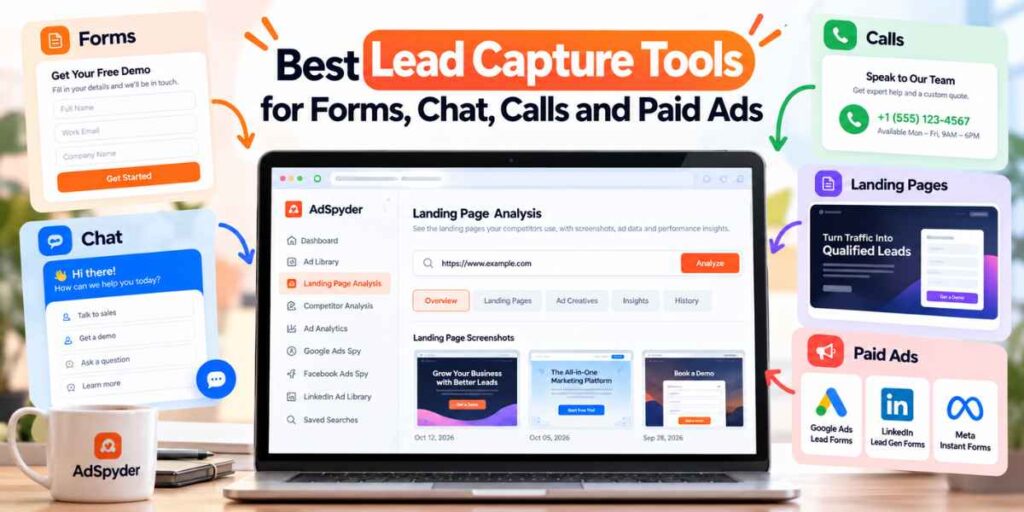
- Before choosing a capture tool, inspect how competitor ads connect to forms, demos, pricing pages, and other destinations with AdSpyder Landing Page Analysis.
Lead capture is the moment anonymous attention becomes something your marketing or sales team can actually act on.
That sounds simple, but a “lead” can arrive through very different paths: a contact form, live chat, demo request, phone call, downloadable resource, LinkedIn form, Google ad, or dedicated landing page.
The best lead capture tool therefore depends on the campaign. A high-intent legal-services search campaign may need call attribution. A B2B LinkedIn campaign may perform better with a prefilled native form. A SaaS product page may need live qualification and meeting routing. This guide compares the tools based on the job they actually perform.
Table of contents
How We Evaluated the Lead Capture Tools
The goal is not simply to collect the largest number of email addresses. Good lead capture balances conversion friction with lead quality.
| Criterion | What We Evaluated |
|---|---|
| Capture experience | How easy is it for the prospect to submit information? |
| Qualification | Can you ask the questions needed to separate strong leads from weak ones? |
| Attribution | Can you tell where the lead came from? |
| Routing | Can the lead move quickly to the right sales or support workflow? |
| Integrations | Does the tool sync cleanly with CRM and marketing automation? |
| Cost structure | Is pricing based on seats, submissions, calls, traffic, or media spend? |
Before testing a new capture method, use the AdSpyder Ad Library to see whether competitors are driving traffic toward demos, trials, pricing pages, native forms, product pages, or other conversion paths.
Lead Capture Tools Compared
| Tool | Capture Method | Best For | Pricing Snapshot | Main Limitation |
|---|---|---|---|---|
| HubSpot Forms | Forms + CRM | Inbound teams | Free tools available | Advanced automation requires paid tiers |
| Typeform | Conversational forms | High-engagement forms | Basic $29/mo monthly | Submission limits |
| Jotform | Flexible forms | SMBs and operational forms | Free; paid tiers available | Limits vary by submissions/storage |
| Intercom | Live chat + messaging | SaaS and product-led teams | Essential $29/seat/mo annually | Costs scale with seats and AI usage |
| Pipedrive LeadBooster | Chat + forms + prospector | Sales teams using Pipedrive | From $32.50/company/mo annually | Best inside Pipedrive ecosystem |
| CallRail | Calls + forms | Local services and phone-heavy campaigns | Lead Tracking $50/mo + usage | Country and usage considerations |
| Invoca | Call attribution | Enterprise call-driven marketing | Custom quote | Enterprise-oriented setup |
| Unbounce | Landing pages + forms | Paid campaign landing pages | Starter $29/mo | Starter traffic/page limits |
| LinkedIn Lead Gen Forms | Native paid-ad form | B2B professional audiences | No separate form fee; ad costs apply | Lead quality depends on targeting and fields |
| Google Lead Forms | Native ad form | Search and Google Ads demand | Included with eligible ad campaigns | Qualification flexibility is narrower than full landing pages |
| Meta Instant Forms | Native social form | Low-friction paid social capture | Media spend based | Low friction can also increase low-intent submissions |
Pricing note: software pricing above is an October 2026 snapshot. Usage, annual billing, contacts, seats, calls, submissions, and ad spend can change the final cost substantially.
Best Lead Capture Tools for Website Forms
1. HubSpot Forms — Best for CRM-Connected Inbound Capture
Best for: companies that want form submissions to become CRM contacts immediately.
Strengths: forms sit inside the larger HubSpot CRM and marketing environment, reducing the need to move lead data between separate systems.
Limitation: the free tools are useful for basic capture, but more advanced workflows, segmentation, and automation can move you into paid HubSpot tiers.
2. Typeform — Best for Conversational Lead Forms
Best for: quizzes, consultations, assessments, surveys, applications, and lead forms where user experience matters.
Strengths: polished one-question-at-a-time experiences, logic, integrations, and strong design control.
Limitation: response limits matter when your traffic volume grows.
3. Jotform — Best for Flexible Form Building
Best for: small businesses, operations teams, bookings, registrations, applications, payments, and custom data collection.
Strengths: free entry plan, broad templates, many form fields, widgets, payment options, and workflow use cases.
Limitation: paid tiers are driven by limits such as form count, submissions, storage, views, and specialized requirements.
If most of your form traffic comes from Google Search, use Google Ads Spy to inspect the keywords, ad promises, and destinations competitors pair with their lead forms before deciding what your own form should ask.
Best Lead Capture Tools for Chat and Real-Time Qualification
4. Intercom — Best for Product-Led and SaaS Conversations
Best for: SaaS companies that want messaging, support, qualification, and sales conversations in one environment.
Strengths: live chat, inbound messaging, shared inbox, AI, proactive support, and increasingly broad communication channels.
Limitation: pricing is not only the base seat cost. AI usage, phone, add-ons, and communication volume can affect the total.
5. Pipedrive LeadBooster — Best for Sales Teams Already Using Pipedrive
Best for: SMB sales teams that want capture and CRM handoff in the same workflow.
Strengths: Chatbot, Live Chat, Web Forms, and Prospector are bundled in one add-on. Visitors can be qualified and then routed toward sales.
Limitation: it makes the most sense when Pipedrive is already your sales CRM.
For B2B teams using chat after LinkedIn campaigns, the LinkedIn Ad Library can help you compare the offers and funnel stages competitors use before prospects arrive on their site.
Best Lead Capture Tools for Phone Calls
Phone leads matter most when prospects want an immediate conversation: healthcare, legal, home services, automotive, insurance, travel, real estate, and other high-consideration services.
6. CallRail — Best for SMB Call and Form Attribution
Best for: businesses that need to know which ads, pages, and channels generated calls.
Strengths: tracking numbers, call attribution, recording, routing, transcription, and optional form tracking. The current Lead Tracking Complete plan combines call and form attribution.
Limitation: usage charges and regional availability need to be considered as volume grows.
7. Invoca — Best for Enterprise Conversation Intelligence
Best for: larger brands with meaningful phone conversion volume and complex attribution needs.
Strengths: dynamic numbers, call recording, offline conversion import, conversation signals, ad-platform integrations, APIs, and enterprise routing capabilities.
Limitation: pricing is quote-based and the product is more suitable for established call-driven acquisition programs than very small businesses.
Best Tool for Lead Capture Pages
8. Unbounce — Best Dedicated Landing Page and Form Builder
Best for: PPC marketers and agencies that need campaign-specific landing pages without rebuilding the main website.
Strengths: drag-and-drop landing pages, built-in lead forms, hosting, templates, and higher-tier experimentation features.
Pricing: current Starter pricing is $29/month on monthly billing, with five landing pages and up to 500 monthly unique visitors.
Limitation: Starter limits are intentionally small, so active paid-media programs can move into higher plans quickly.
Do not choose a landing-page tool only by template design. Use URL & Domain Analysis to see which competitor campaigns repeatedly send traffic toward dedicated landing URLs, pricing pages, signup flows, and product pages.
Best Lead Capture Options Inside Paid Ads
Native lead forms reduce friction because users do not have to wait for a separate landing page, navigate a new site, or manually re-enter information the ad platform already knows.
That can increase lead volume—but it can also reduce the commitment required to submit. For that reason, native forms need thoughtful qualification.
9. LinkedIn Lead Gen Forms — Best for B2B Professional Data
Best for: B2B campaigns targeting job titles, companies, industries, professional roles, and business audiences.
Strengths: profile-based prefill, custom questions, hidden tracking fields, CRM synchronization, retargeting, and Campaign Manager analytics.
Pricing: LinkedIn currently charges no additional fee for the Lead Gen Form itself beyond the associated advertising costs.
Limitation: asking too many questions can add friction. LinkedIn itself recommends keeping forms focused rather than automatically using every available field.
10. Google Ads Lead Forms — Best for Search and Google Campaign Intent
Best for: advertisers that want to capture contact details directly from eligible Google Ads placements.
Strengths: users can submit information directly from the ad experience, reducing the steps required to become a lead. Google also supports verification features such as OTP verification in eligible workflows.
Limitation: native lead forms provide less control over the full conversion experience than a dedicated landing page.
11. Meta Instant Forms — Best for Low-Friction Social Capture
Best for: consumer services, local businesses, education, offers, quotations, and other Meta campaigns where reducing mobile form friction matters.
Strengths: prospects can complete forms inside the Meta ad experience instead of loading an external page.
Limitation: extremely easy submission can generate leads who have invested less effort in the buying process. Stronger qualifying questions and faster follow-up often become more important.
When evaluating Meta lead-capture angles, use Facebook Ads Spy to compare competitor creatives, offers, CTAs, and destination patterns before deciding between a native form and a website journey.
Native Lead Form or Landing Page: Which Should You Use?
| Situation | Better Starting Point | Why |
|---|---|---|
| Simple newsletter or resource signup | Native form or short website form | Very little qualification is required |
| B2B report download | LinkedIn native form | Professional profile data can reduce typing |
| Complex enterprise demo | Landing page | You need proof, positioning, qualification, and context |
| Urgent local service | Call capture | Prospect may want immediate human contact |
| Product page with active buyers | Chat | Answers questions while intent is active |
| Paid search with specific offer | Campaign landing page | Strong message match and conversion control |
Best Choice by Use Case and Budget
Best free starting point for basic inbound capture
HubSpot Forms or Jotform Starter.
Best for polished interactive forms
Typeform.
Best for SaaS website conversations
Intercom.
Best sales-CRM capture bundle
Pipedrive LeadBooster.
Best for SMB phone attribution
CallRail.
Best enterprise call intelligence
Invoca.
Best dedicated paid-traffic landing page tool
Unbounce.
Best native B2B paid-ad capture
LinkedIn Lead Gen Forms.
Where AdSpyder Fits in the Lead Capture Stack
AdSpyder is not a form builder, chatbot, call-tracking platform, or CRM.
Its role comes before and around the capture point: understanding which traffic sources, ads, offers, CTAs, and post-click experiences competitors use to create leads.
Ad intelligence → identify the offer and campaign angle
Landing-page intelligence → study the conversion journey
Lead capture tool → collect or qualify the prospect
CRM → store and route the lead
Sales / automation → follow up and progress the opportunity
Use Ad Analytics when you want competitor campaign context around the form or conversion flow rather than evaluating lead-capture software in isolation.
Lead Capture Tool Buying Checklist
☐ Where does most of our high-intent traffic come from?
☐ Do prospects prefer forms, chat, phone, or native ad submission?
☐ How many fields are truly required before sales can follow up?
☐ Can the tool distinguish high-intent leads from low-intent submissions?
☐ Does source and campaign attribution remain attached to the lead?
☐ Can the lead sync directly into our CRM?
☐ How quickly can sales be alerted?
☐ Can we route leads by region, service, company size, or intent?
☐ Does the form work well on mobile?
☐ What happens to pricing when submissions, seats, traffic, or calls double?
☐ Can we export our data if we change platforms?
☐ Do privacy and consent controls match our markets?
☐ Are spam and fake submissions being filtered?
☐ Will we measure cost per submission—or cost per qualified opportunity?
FAQs About Lead Capture Tools
What is lead capture?
Lead capture is the process of turning an anonymous prospect into an identifiable contact by collecting information such as name, email, phone number, company, need, or another signal that allows follow-up.
What is the best lead capture tool?
It depends on the capture channel. HubSpot, Typeform, and Jotform are useful for forms; Intercom for chat; CallRail for call-driven campaigns; Unbounce for dedicated landing pages; and LinkedIn or Google native forms for paid-ad capture.
Are free lead capture tools good enough?
They can be for low-volume websites and early testing. Upgrade when submission limits, branding, routing, automation, analytics, integrations, or compliance requirements become important.
Are native lead forms better than landing pages?
Native forms usually reduce friction and can increase submission volume. Landing pages provide more space for product explanation, proof, differentiation, qualification, and conversion control. The better option depends on buyer intent and offer complexity.
How many fields should a lead capture form have?
Ask for the minimum information required for the next action. Low-commitment offers usually need fewer fields, while demos, consultations, quotations, or enterprise inquiries may justify additional qualification questions.
How should I measure lead capture performance?
Track submission rate and cost per lead, but continue into qualified-lead rate, meeting rate, opportunity rate, pipeline, CAC, and revenue. A higher-converting form is not automatically better if it produces weaker leads.
Choose the capture method after you understand the traffic
Research competitor ads, offers, keywords, landing pages, and conversion paths first—then choose the form, chat, call, or native lead workflow that matches buyer intent.