
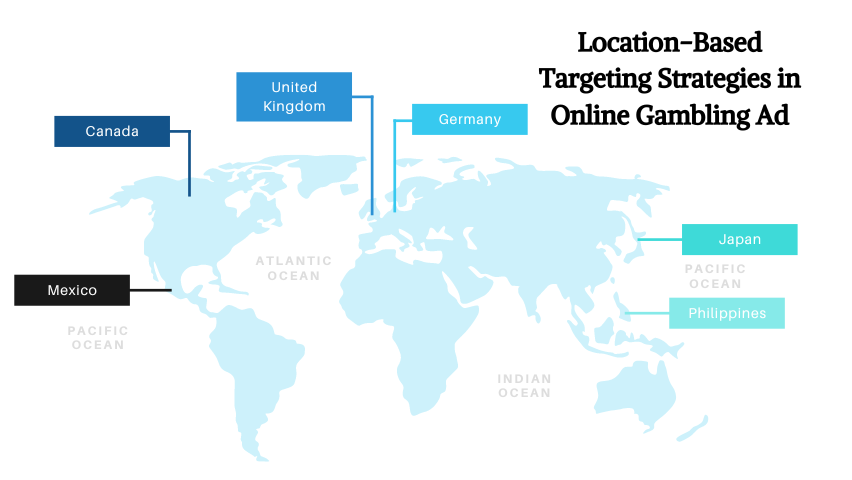
Location-based targeting helps you show ads to people based on where they are, where they’ve been, or what places they’re currently near. It’s one of the fastest ways to improve relevance because it aligns your message with real-world intent—think “near me” searches, store visits, events, and local availability.
In this guide, you’ll learn what location based targeting really means, how geofencing marketing works, and how to set up google ads location targeting the right way—without wasting budget on the wrong areas.
What is Location Based Targeting?
Location based targeting (also called geo targeted ads or location targeting ads) is a way to deliver ads based on geography. Depending on the platform, you can target:
- Countries, states, cities, ZIP/pin codes (classic geo targeting)
- Radius targeting (e.g., 2–10 km around a store or landmark)
- Presence-based audiences (people who live in / were recently in / are traveling in an area)
- Place visitation segments (people who visited certain locations—often via partners/DSPs)
This concept also connects naturally with messaging strategy. For example, if you use video, the structure of your funnel matters—especially in B2B. A clear B2B video marketing funnel can help you decide what to say to “nearby” users versus “researching” users.
How Location Based Targeting Ads Work (In Simple Terms)

Platforms determine location using signals like GPS (mobile), Wi-Fi networks, IP address, device settings, and (in some cases) visit patterns. Then, your campaign settings decide who qualifies.
| Method | What it targets | Best for |
|---|---|---|
| Geo targeting | Cities/regions/ZIPs | Local services, multi-city brands, regional offers |
| Radius targeting | A circle around a point | Store footfall, clinics/gyms, event-based promos |
| Proximity / “nearby” | People currently close to a place | Flash offers, time-sensitive conversions |
| Visit-based segments | People who visited a location type | Competitor conquesting, high-intent audience building |
You can also combine location with creative strategy. For example, gamified experiences work better when tied to a place (“Unlock a reward when you visit”). If you want ideas, gamification in advertising pairs naturally with location triggers.
Geofencing Marketing Explained (Without the Hype)
Geofencing advertising is a specific form of location targeting where you define a boundary (a “fence”) around a real-world place—like a mall, competitor store, stadium, university, or business district. When devices enter (or sometimes exit) that zone, you can trigger ads or build audiences.
- A clear physical conversion point (store, clinic, venue)
- An offer that makes sense “right now”
- Creative that matches the place context (not generic)
If you’re running location-based campaigns through DSPs, this starts to overlap with programmatic buying. If you want a clearer view of how automated ad delivery works across placements, this guide on programmatic ads is a useful reference—even if your industry isn’t betting.
High-ROI Use Cases for Geo Location Ads
Here are practical ways brands use location based ads to lift CTR, leads, and store visits—without expanding budget.
| Use case | Targeting setup | Creative angle |
|---|---|---|
| Local services (plumbers, dentists, gyms) | Radius + call extensions | “Same-day slots in [Area]” + trust proof |
| Retail footfall | Store radius + “nearby” users | Offer + directions + “today only” urgency |
| Competitor conquesting | Geofence competitor locations | Better offer + clear differentiation (avoid brand misuse) |
| Events (expo, concerts, sports) | Fence venue + time window | “Welcome to [Event]—get [perk] nearby” |
| Franchises (multi-city) | City/ZIP segmentation per store | Local testimonials + local pricing + local CTA |
One simple upgrade: use localized proof like “Rated 4.7★ in [City]” and highlight the best-performing local creative. If your offer depends on credibility, adding a PR mention or local press can help—this is where press releases in PR marketing can support ad performance.
How to Set Up Google Ads Location Targeting
Google Ads gives you several location controls: targeting by country/city/ZIP, radius targeting, location exclusions, and location options (presence vs interest). The key is choosing the right combination for your goal: leads, calls, store visits, or online purchases.
- Open your campaign → go to Settings
- Find Locations → add your targets (city/region/ZIP) or use radius targeting
- Add Exclusions (areas you don’t serve)
- Review Location options (presence vs interest) to avoid unwanted traffic
- Use a separate campaign or ad group for each major area if budgets/offers differ
Common mistake: running one “all locations” campaign with one generic landing page. If you’re targeting multiple areas, your ad copy and landing page should reflect the location (service area, testimonials, delivery time, pricing, etc.).
How Location-Based Targeting Works on Meta (Facebook/Instagram)

Meta’s location targeting lets you reach people based on where they live, where they recently were, or places they’re currently in. This is ideal for local awareness, lead gen, store traffic, and hyperlocal offers.
- At the ad set level, go to Audience
- Choose Locations → add cities, pin drops, or radius
- Use include/exclude to remove irrelevant areas
- Layer in demographics + interests only after location is clean
If you’re using location targeting on Meta, be extra strict about audience overlap. When multiple ad sets target nearby areas, you can accidentally create auction competition. A simple fix is to use larger regions for TOF and tighter radius only for BOF.
Location Based Targeting Best Practices (That Actually Move Results)
Great location campaigns aren’t “set and forget.” They’re a combination of smart geography + clear intent + localized creative + controlled measurement.
- Match creative to place (don’t run generic ads to hyperlocal audiences)
- Use exclusions (water, airports, irrelevant suburbs, or non-serviceable regions)
- Split by profitability (high-LTV areas get higher bids/budgets)
- Localize landing pages: map, distance, timings, delivery SLA, “serving [Area]”
- Test 2–3 offers per location before scaling (discount, bundle, free consult)
- Use ad scheduling based on local peak hours (especially for calls)
And don’t ignore format. Video can lift intent in local campaigns, especially for services. If you’re building location-based video creatives (store tour, “how it works,” quick demo), the structure from your funnel matters—again, that B2B video marketing funnel approach is useful even for local lead gen: awareness video → proof → conversion.
Key Location-Based Advertising Statistics (Quick Snapshot)
Measurement & Optimization for Location Targeting
The easiest way to waste budget on geo location ads is to optimize only for clicks. For local performance, you want to measure outcomes that reflect real business value.
- CPA / CPL by city/ZIP/radius
- Call volume + call quality (duration, qualified rate)
- Store visits (when available)
- Landing page conversion rate by location
- Search terms that show local intent (“near me”, “open now”, neighborhood names)
Run “geo experiments” like this: keep the same creative and offer, but split targeting into (A) 2–3 km radius and (B) city-wide. If (A) wins on CPL but has lower volume, scale with more radii around high-demand pockets rather than expanding broadly.
Also, align your optimization with the stage of the customer journey. If you’re mapping touchpoints (ads → search → visit → purchase), you’ll find location triggers show up at different moments. That’s why location targeting often improves performance when paired with stronger top-to-bottom messaging—especially for regulated industries. If that’s relevant, review responsible gambling advertising for examples of how targeting + messaging constraints should work together.
Privacy, Policy, and Brand Safety (Don’t Skip This)
Location targeting can be powerful—but it also requires discipline. Avoid messaging that feels invasive (“We saw you at…”) and stick to value-based framing (“Available near you”, “Serving your area”, “Pickup in 15 minutes”).
- “Now available in [City]”
- “Fast delivery to [Area]”
- “Book a slot near [Landmark]”
- “See directions / call the nearest branch”
If you work in regulated categories, ensure your location campaigns follow platform policies and local laws (especially for sensitive products). Keep targeting compliant, keep claims verifiable, and avoid manipulative urgency.
How AdSpyder Helps With Location-Based Campaigns
Location-based performance improves fastest when you learn what already works in that geography—offers, creative styles, CTAs, landing page layouts, and even “local language patterns.”
- Identify winning local angles (discounts, delivery promises, guarantees)
- Improve creative iteration speed by modeling proven patterns
- Avoid wasted spend by understanding what the market is already saturated with
If your campaigns are product-focused and you’re pushing traffic through paid channels, pairing location with offer testing is a strong “paid product” move—useful ideas here: paid product marketing.
FAQs: Location Based Targeting & Geofencing Advertising
What is the difference between geo targeting and geofencing marketing?
How do I set up Google Ads location targeting?
What is the best radius for location based ads?
Do location targeting ads work for e-commerce?
Why do my ads show outside my target location?
What industries benefit most from geofencing advertising?
Is location based targeting privacy-safe?
Conclusion
Location-based targeting works because it aligns ads with real-world intent. Start with clean geography (targets + exclusions), choose the right method (city vs radius vs geofencing), localize your creative and landing page, and measure outcomes by area—not just overall averages. When you do it right, you’ll waste less budget and win the moments where customers are most ready to act.



