Shopping Ads Intelligence
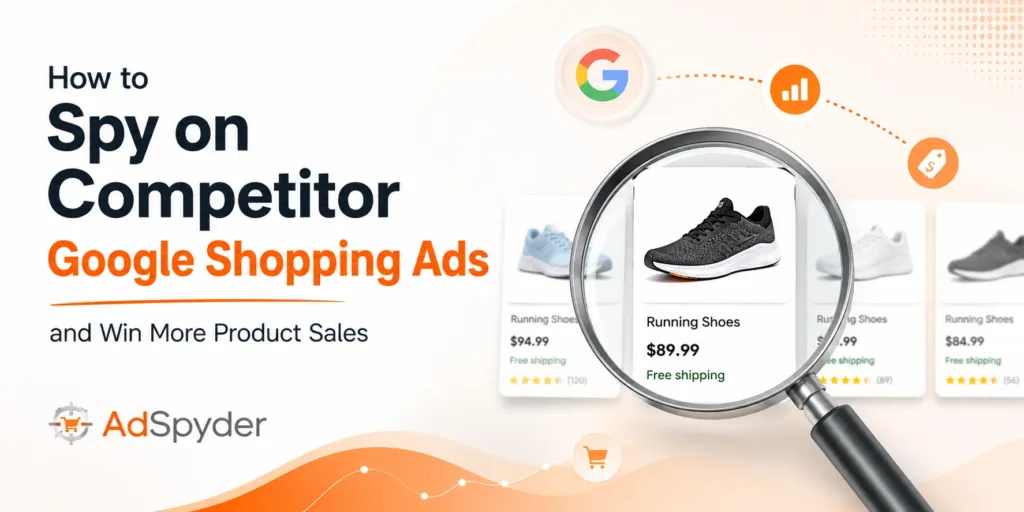
Quick Answer: To spy on competitor Google Shopping ads, search your competitor’s brand, domain, or product category inside AdSpyder Shopping Ads Spy, then analyse their product titles, prices, images, landing pages, country targeting, and last-seen date. Use those signals to improve your product feed, adjust pricing, test stronger images, and find gaps your competitors have left open — all from a 94 million+ Shopping ad archive covering 2022–2026 across 100+ countries.
If your competitor keeps showing above you in Google Shopping, the problem is not always your bid. Their product title may match buyer intent better, their image may earn more clicks, or their price positioning may make your offer look weak before a shopper ever reaches your page.
This guide gives you a practical workflow to find what competitors are promoting, how they position products, where they are pricing aggressively, and which listings you should take seriously. It uses AdSpyder’s Shopping Ads Spy workflow and confirmed archive data — not generic advice about “researching your competitors.”
The difference from other guides: after the step-by-step workflow, you’ll find a decision framework for whether to undercut on price or differentiate — built directly from what the data shows, not from what feels right.
Table of Contents
Why You Should Spy on Competitor Google Shopping Ads Before Scaling
Google Shopping ads are not like search text ads. The buyer sees the product image, price, merchant name, and product title before clicking — and the click decision happens in under two seconds. That means your competitor can beat you before the landing page even loads.
A cheaper product is not always the winner. A clearer title, a sharper image, a stronger category match, or a better offer can change who gets the click. Shopping ad competitor research is therefore a different job from search ad competitor research — it needs to cover all three variables simultaneously: image, price, and title.
Practitioner note
Do not start by copying competitor products. Start by finding the repeated patterns: which products they promote consistently, what title structure they use, what price bands they defend, and what image style they trust enough to keep running. Patterns are signal. Single observations are noise.
A proper google shopping ads competitor research process should answer five questions:
- Which competitor product listing ads appear repeatedly — not just once?
- Which price points are competitors anchoring in this category?
- Which product images break the visual pattern of the rest of the carousel?
- Which landing pages back up the promise made in the Shopping ad?
- Which products are competitors ignoring that you could own?
AdSpyder Original: What the Shopping Ads Archive Actually Shows
AdSpyder’s Shopping Ads Spy is built on a 94 million+ Google Shopping ad archive covering a 5-year window (2022–2026) across 100+ countries. Before we get to the workflow, here is what that archive actually reveals about the competitive landscape you’re operating in.
94M+
Google Shopping ads indexed
5-year archive, 2022–2026
100+
Countries covered
US, UK, India, Mexico, Australia account for ~50%
96.5%
Of ads carried a product image
2,000-ad random sample. Image is the baseline, not the differentiator.
8
Median carousel position
Only 19.4% of Shopping ads appeared in slots 1–3. Most volume is below the fold.
Source: AdSpyder Google Shopping ads archive (94.9M ads, 2022–2026). Image and position figures are from a 2,000-ad random sample. AdSpyder platform data, May 2026.
The 19.4% top-3 figure is important for your strategy: most Shopping ad clicks — and most of your competitor’s volume — happen below the top of the carousel. That means a position 5–8 ad with a stronger visual or price than adjacent competitors will win clicks. You do not need the top slot to outperform.
The archive also reveals the brands competing in this space. Common advertisers include Amazon (across multiple country storefronts), Etsy, SHEIN, eBay, Walmart, Target, AliExpress, Lazada, Shopee, Flipkart, Mercado Libre, ASOS, and Allegro. Marketplace giants and D2C fashion brands dominate — which means specialist retailers and D2C brands can learn from large-advertiser strategies without needing to match their budgets directly.
Honest limitation
You cannot see a competitor’s exact Shopping bid, exact budget, or full conversion rate from public ad intelligence. What you can see is the market signal: product selection, price positioning, title structure, image choices, region targeting, landing page, and ad persistence. That is enough to make better decisions than guessing.
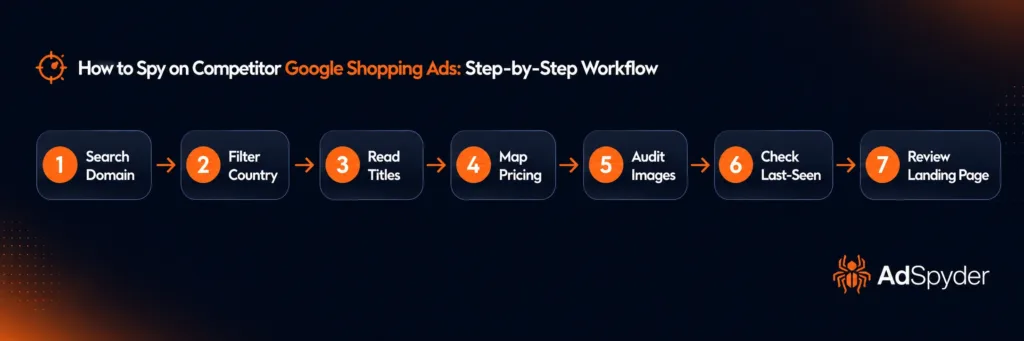
How to Spy on Competitor Google Shopping Ads: Step-by-Step Workflow
Use this workflow when you need practical google shopping ad intelligence before changing your product feed, price, or campaign budget. It takes 20–30 minutes for a first competitive sweep and under 10 minutes once you know what you’re looking for.
Search by competitor brand, domain, or product category
Open Shopping Ads Spy and start with the most direct competitor name. Then repeat the search with category terms like “running shoes,” “wireless earbuds,” “protein powder,” or your own priority product group. You have two paths: domain search (pulls everything a specific competitor has run) and keyword search (shows the full competitive field for a product type). Start with keyword search to map the landscape, then drill into the top 3–4 domains for deeper analysis.
Tip
Run separate searches for brand keywords and category keywords. The competitors bidding on your brand name are a different threat from those targeting your category terms — and both need separate research.
Filter by country and set your date range
Do not mix India, the US, the UK, and Australia in the same research view unless you sell internationally. Price sensitivity, marketplace dominance, delivery promises, and title language all change by market. AdSpyder’s archive spans 100+ countries, with the US (21M+ ads), UK (10M+ ads), and India (6.1M+ ads) as the three largest markets. Filter to your target geography first. For pricing and title intelligence, focus on the last 12–18 months. For image style benchmarking, expand to the full archive to see whether the category has evolved.
Study product title patterns — across 10–20 ads, not one
Resist the urge to focus on a single ad. You are looking for the pattern across a set. Ask: what word appears first in 80%+ of their titles? Do they lead with brand or product type? Do they include size, colour, material, or benefit? Are titles short and keyword-focused, or long and descriptive? Your goal is not to copy the title. Your goal is to find what the market is trained to click — and then write yours to match that intent while emphasising your own product advantage.
Watch for this
Competitors who front-load their brand name are running brand-defence campaigns, not acquisition. You can target the same product terms with a title that leads with the category keyword and often win the broader-match searches they’re not explicitly optimising for.
Map competitor pricing into three bands
Put competitor products into three buckets: cheaper than you, close to you, and premium to you. If most competitors are cheaper, you need a stronger value signal in your image and title — or a bundle play. If you are cheaper, your image and title must still look trustworthy enough to earn the click. If competitors are clustered in a narrow price band with no clear low-cost leader, a marginal price drop is often enough to shift the carousel click. Price is the only piece of ad copy a shopper reads without clicking — it is always a strategic choice, not just a number.
Audit competitor image style systematically
In Shopping ads, the image is the hook. Since 96.5% of Shopping ads carry a product image (AdSpyder random sample data, May 2026), the question is not whether to include an image — it is what kind. Build a quick tally across competitor ads: white-background cutout vs lifestyle vs model shot, single product vs bundle, clean image vs text overlay (discount badge, size callout). The dominant style is what your category has normalised around. The rare exception on a long-running ad is almost always working to break through. That is where your test opportunity is.
Key insight
An ad that has been running consistently for 6+ months is almost certainly profitable. That is your benchmark — not a competitor’s newest creative, which hasn’t yet proven its value.
Use last-seen date to separate active from retired ads
This is the signal most people ignore entirely — and the one that changes your decisions the most. Every ad in AdSpyder’s archive carries a last-seen date: the most recent date it appeared in search results. Sort by last-seen descending. Ads at the top are what’s live right now. Ads with last-seen dates 6+ months old are creatives a competitor tested and dropped. Retired ads tell you what they tried and decided was not worth continuing. If you are considering a similar creative approach, a competitor’s retired ad is a preview of what not to invest in. Current ads show where their budget is going today.
Open competitor landing pages and map the promise
Your competitor Shopping ad research is incomplete if you stop at the ad card. Open the landing page and check whether the page reinforces the same product promise, price, discount, variant, shipping message, and trust cues. A competitor’s ad showing £49 that leads to a page showing £62 after delivery costs is a weakness you can exploit with a transparent offer. A competitor whose page loads a 4.8-star review block immediately is telling you that social proof is a conversion driver in your category. Both are things worth knowing before you write your own product page.
Turn competitor Shopping ads into your next product test
Search 94M+ Shopping ads across 100+ countries. Analyse product listings, pricing, images, and landing pages before you spend more on Google Shopping campaigns.
What Signals Should You Track in Competitor Product Listing Ads?
A shopping ads spy tool becomes useful only when you know what to measure. Track these signals every time you review a competitor, and map them to a specific action in your own campaign.
| Signal | What to check | Action for your campaign |
|---|---|---|
| Product title | Brand first or category first; size, material, benefit, variant placement | Rewrite titles around buyer intent, not internal SKU names |
| Price positioning | Low, mid, premium, discount-led, bundle-led, price cluster vs gap | Adjust offer framing, test bundles, or fill a gap the cluster has left open |
| Image style | Cutout, lifestyle, model, pack shot, colour variant, text overlay | Test a differentiated image style for high-spend products |
| Last-seen date | Recent visibility vs old or retired listing | Prioritise consistently recent ads; learn from retired ones |
| Country/region | Which markets competitor is active in vs absent from | Expand into a market your top competitor is not defending |
| Landing page | Price match, delivery promise, reviews, trust cues, variant selection | Fix promise mismatch between your ad card and product page |
Undercut or Differentiate: How to Decide After Your Research
Once you have pulled competitive Shopping ad data from AdSpyder, you face a decision that the data itself should drive. Picking a direction before you have looked at the numbers is the most common strategic mistake.
| What the competitor data shows | Recommended move |
|---|---|
| Competitors clustered at similar prices with no clear low-cost leader | Price below the cluster — even a marginal gap wins the price-scan |
| One competitor clearly dominates on low price | Do not fight on price — differentiate via title specificity, image quality, or bundle |
| Competitors all use white-background single-product images | Test a lifestyle or in-context image — visual standout in a uniform carousel |
| Competitors front-load brand names in titles | Lead with the category keyword — capture broader-match queries they are not explicitly targeting |
| Long-running competitor ads include specific attributes (size, material, colour) | Mirror the attribute structure — those signals are triggering qualified matches |
| Last-seen data shows a competitor recently retired their lowest-price listing | Fill that price slot immediately — there is a gap in the carousel they have left open |
The bundle differentiator — one position most guides miss
If competitors are advertising individual SKUs at a given price, and you can bundle two complementary products at a combined price that still appears cheaper than buying both separately, you create a new price anchor that no competitor is occupying. The Shopping carousel shows your price and your competitor’s price side by side — a bundle framing makes direct comparison harder and shifts the perceived value calculation in your favour.
Where AdSpyder Fits in Your Shopping Ads Workflow
Use AdSpyder’s Shopping Ads Spy before you change campaigns — not after performance drops. Here is the workflow for e-commerce teams managing active Shopping spend:
Before launch
Research competitor product titles, price bands, hero images, and landing pages before building your feed. The feed you build informed is structurally better than one built in a vacuum.
During testing
Compare your promoted products against competitor product listing ads that keep reappearing. If your top spend product has a weaker image than the competition, that is your next test — not a bid adjustment.
Before scaling
Check whether your offer, image, and title can survive against the strongest competitor listings in your category before doubling budget. Scaling a structurally weak listing costs more and fixes nothing.
Connect the Shopping Ads Spy insight with the rest of the AdSpyder stack. Use Google Ads Spy to review search ad messaging from the same competitors, Landing Page Analysis to audit post-click experience in depth, and Text Ad Generation to turn competitor title patterns into fresh ad copy tests.
Free Research vs AdSpyder Shopping Ads Spy
Free tools are useful for basic validation. They are not enough when you need a repeatable competitor shopping ads analysis workflow across multiple brands, markets, or product categories.
| Method | Best for | Limitation | Where AdSpyder adds |
|---|---|---|---|
| Manual Google searches | Quick SERP checks | Location, device, time, and personalisation distort results; no historical data | Structured ad discovery across markets, competitors, and archive depth |
| Google Ads Transparency Center | Checking active advertiser creatives by format | No price data, no last-seen date, limited Shopping product workflow | Product listing, pricing, image, and last-seen date in one view |
| Merchant Center / Auction Insights | Your own Shopping performance and impression share | Does not show competitor product titles, images, or landing pages | Shows the competitor ad layer behind the market signal |
| AdSpyder Shopping Ads Spy | Full competitor research workflow across brands, markets, and product lines | Does not show exact bids, budgets, or conversion rates — public data only | 94M+ archive, 100+ countries, price data, last-seen, image preview, landing page link |
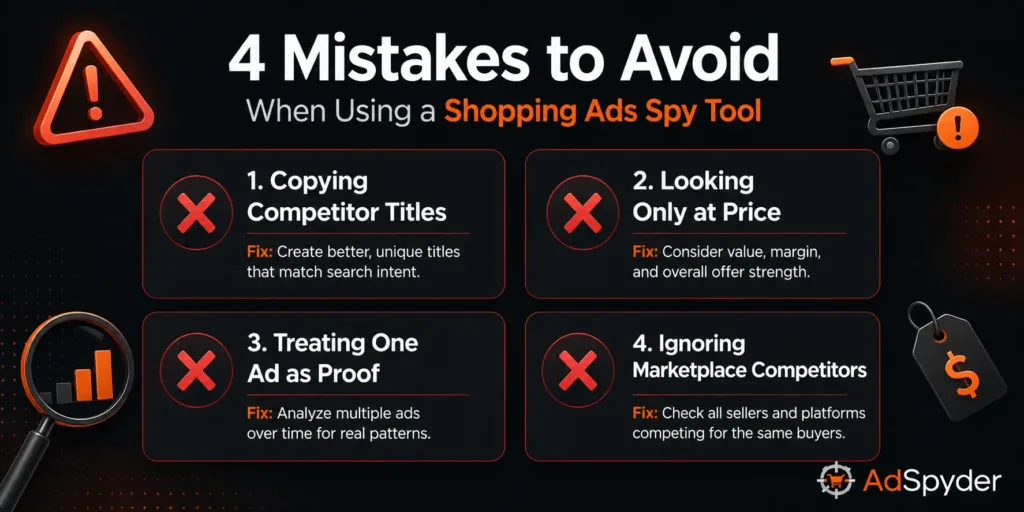
Mistakes to Avoid When Using a Shopping Ads Spy Tool
Copying competitor titles
Copying makes your listing interchangeable and signals nothing about your product’s advantage. Extract the structure — what word they lead with, how they use attributes — then write for your own product strength.
Looking only at price
Cheap does not always win the click. Check image quality, review cues, delivery promise, and landing page trust — a more expensive competitor with a better image and clear returns policy often wins over a cheaper one that looks untrustworthy.
Treating one ad as proof
One listing is a clue. Repeated visibility across weeks or months is the signal worth acting on. A competitor who has run the same creative for six months has likely found something that works — that is your benchmark.
Ignoring marketplace competitors
Amazon, eBay, Shopee, Flipkart, Lazada, and Mercado Libre shape buyer price expectations and trust standards even when they are not your direct brand competitor. Their presence in your category sets the bar your listing must clear.
Pre-Launch Checklist for Competitor Shopping Ads Analysis
Complete this before you launch or scale a Shopping campaign. Each item maps to a specific intelligence action the workflow above covers.
- Search your top 5 competitor brands in AdSpyder Shopping Ads Spy
- Search your top 5 product categories — not only brand names
- Filter by your target country and record findings market-by-market
- Document competitor product title patterns across 10+ ads per domain
- Map competitor pricing into low, mid, and premium bands
- Identify the dominant image style in your category and decide whether to match or break it
- Sort by last-seen date — separate active ads from retired creatives
- Open at least 3 competitor landing pages and compare promise, price, delivery, and trust cues
- Make one clear positioning decision: undercut, differentiate on title, or differentiate on image
- Set a review cadence — weekly quick scan, monthly deep review, more often during sale periods or product launches
Find the Shopping ads your competitors are betting on right now
94M+ Shopping ads. 100+ countries. Product listings, pricing strategy, image style, last-seen dates, and landing pages — in one place. Trusted by 23,000+ marketers.
Frequently Asked Questions
How do I spy on competitor Google Shopping ads? +
Use AdSpyder Shopping Ads Spy to search competitor brands, domains, or product categories. Review product titles, prices, images, landing pages, country filters, and last appearance. That combination gives you a complete picture of what competitors are actively promoting and where they have left gaps.
Can I see a competitor’s exact Google Shopping budget? +
No. Public competitor research tools cannot show exact private budgets or bids. What you can see is the market signal: products promoted, price position, ad persistence, title structure, image choices, and landing page. That is enough to make better product feed and campaign decisions than guessing.
How many Google Shopping ads does AdSpyder’s archive cover? +
94 million+ Google Shopping ads from a 5-year archive (2022–2026) across 100+ countries. The top five markets — US, UK, India, Mexico, and Australia — together account for roughly 50% of ads in the archive. Common advertisers include Amazon, Etsy, SHEIN, eBay, Walmart, Shopee, Flipkart, Mercado Libre, and ASOS.
How often should I run competitor shopping ads analysis? +
For active Shopping campaigns, run a quick weekly review and a deeper monthly review. During sale periods, product launches, or seasonal demand spikes, review more often. The last-seen date filter in AdSpyder makes recurring reviews fast — you can see at a glance what new creatives have appeared since your last session.
Can I use AdSpyder for Shopee-style marketplace ad research? +
Yes. Marketplace advertisers including Amazon, Shopee, Flipkart, Lazada, and Mercado Libre appear in AdSpyder’s Shopping archive. For ads spy Shopee-related research, focus on product title structure, pricing, marketplace positioning, and repeated product visibility across the relevant country markets where those platforms dominate.
Should I copy competitor Shopping ad titles? +
No. Use competitor titles as structural research — extract the pattern, then write your own. Copying produces a listing that looks interchangeable and gives shoppers no reason to choose you over the original. The goal is to understand what the market is trained to click, then communicate your own product advantage using that structure.
How is Shopping ad research different from Search ad research? +
Search ad intelligence is primarily about copy — headlines, descriptions, keyword targeting. Shopping ad intelligence adds two extra layers: price signals (the price shown in the carousel is the primary click trigger before any copy is read) and image strategy (with 96.5% of Shopping ads carrying an image, visual quality is the baseline expectation, not the differentiator). For Shopping campaigns, a copy-only analysis misses the two factors that actually drive carousel clicks. Use Google Ads Spy for search copy and Shopping Ads Spy for product-level intelligence.