Quick Answer
To use an ad library for better copy, search by CTA phrases — not just competitor brand names — filter for long-running ads as a proxy for what worked, and study messaging across multiple platforms, not just Meta. AdSpyder’s Ad Library indexes 400M+ ads across 10 platforms so you can research exactly what competitors are running on Google, YouTube, LinkedIn, and Meta in one place.
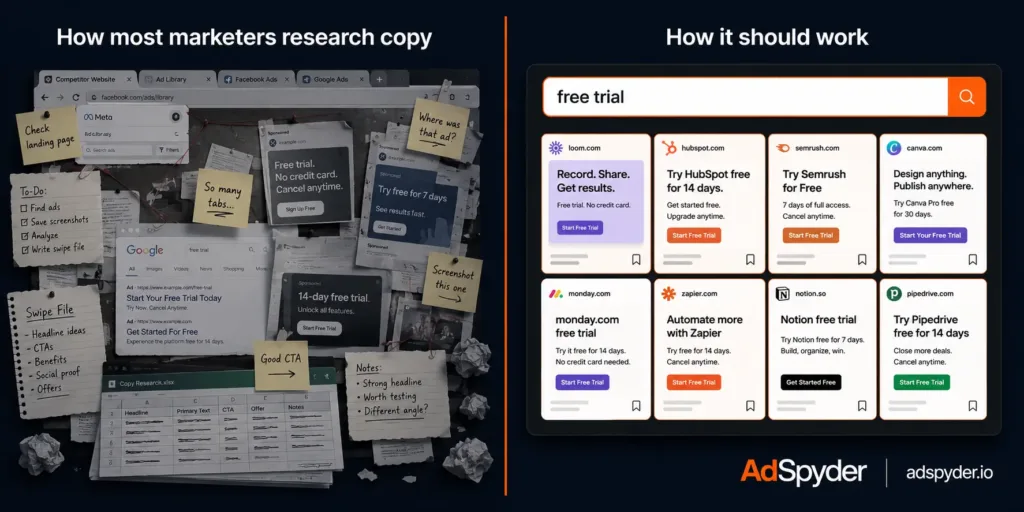
Most ad copy advice tells you to “study what’s working.” What it doesn’t tell you is how to actually find it. You open the Facebook Ad Library, search a competitor’s name, scroll through 40 ads with no performance data, and walk away with nothing you can use.
This guide gives you a specific, data-backed workflow — what to search, what signals to look for, and how to turn competitor ads into sharper copy on your own campaigns. The methodology is grounded in original data from 400M+ ads across 10 platforms, not general advice you’ve already read.
The key difference from every other “how to use the Meta Ad Library” guide: this goes beyond Meta, uses real data on which CTAs dominate at scale, and covers the one search behaviour that only 1.5% of ad library users ever try — but that gives you the highest-signal copy intelligence available.
Table of Contents
Why Native Ad Libraries Leave Copy Researchers Stuck
The Meta Ad Library, Google Ads Transparency Center, and TikTok’s library are useful for one thing: confirming that a specific advertiser is running ads right now. That’s roughly it.
For copy research, they have a structural problem. You can only search by advertiser name or keyword in the ad text. You can’t search by CTA button type, filter by how long an ad has been running, or compare what the same brand says on Google versus what they say on LinkedIn. Many native libraries only show currently active ads — there’s no archive to study patterns over time.
Most critically: they’re siloed by design. Your competitor isn’t only on Meta. They’re running search ads on Google with different headlines, YouTube pre-rolls with different hooks, and LinkedIn ads with different positioning. Each platform gets different copy tuned to a different audience intent level. If you only look at Meta, you see one-tenth of their creative strategy at best.
⚠ The single-platform trap
A competitor running ads on Google, Meta, YouTube, and LinkedIn has four separate copy strategies — each tuned to a different audience intent level. Research only Meta and you’re missing 75% of their messaging.
The Search Behaviour That 97% of Ad Library Users Skip
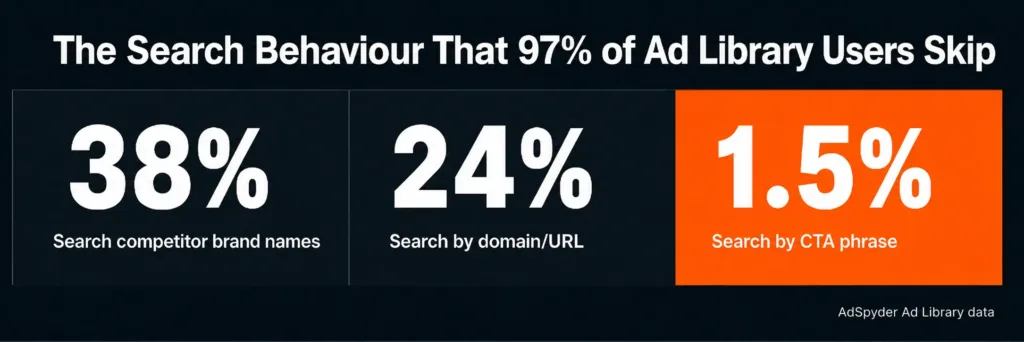
Across 88,000+ searches in AdSpyder’s Ad Library by 6,800+ users, here is how the search intent breaks down:
38%
Single-word brand or topic searches
24%
URL or domain lookups
1.5%
CTA phrase searches (“free trial”, “shop now”)
Source: AdSpyder Ad Library search logs, May 2026.
Only 1.5% of searches are copy-pattern searches — queries targeting CTA phrases and offer language. Yet that 1.5% surfaces the most directly usable copy intelligence in the entire library.
When you search “free trial” in an ad library, you don’t get one competitor’s approach. You get every advertiser in your category who has used that phrase — different industries, different price points, different creative executions of the same conversion goal. You’re studying a copy pattern at scale, not a single brand’s choice.
“Free trial” is the most-searched copy phrase in AdSpyder’s library (991 searches — four times the next most common). “Black Friday” (238), “shop now” (102), and “buy now” (42) round out the top. These aren’t random — they’re the phrases copy researchers already know matter. The gap is that most users never get there. Source: AdSpyder platform data, May 2026.
💡 Try this first
Before you search any competitor by name, run a CTA phrase search for your conversion goal first. If you sell SaaS, search “free trial”. If you’re in ecommerce, search “shop now”. You’ll see how your entire category frames the same goal — that context makes your subsequent competitor research far sharper.
Search 400M+ ads by CTA phrase, format, and competitor domain
Google, Meta, YouTube, LinkedIn, TikTok — all in one place. No native library covers this.
What 14 Million CTA Buttons Tell You About Copy
AdSpyder’s Meta archive contains 43.9 million ads. Of those, roughly 14.4 million carry a clean, populated CTA button value. Here is what the distribution looks like — and what it means for your own copy decisions.
| CTA Button | Historical (43.9M ads) | % of CTAs | Real-Time (11M ads) |
|---|---|---|---|
| Learn More | 4,349,885 | 30.3% | 28.6% |
| Shop Now | 3,771,721 | 26.2% | 24.9% |
| Send Message | 876,078 | 6.1% | 6.6% |
| Send WhatsApp Message | 775,461 | 5.4% | 6.0% |
| Sign Up | 589,627 | 4.1% | 3.5% |
| Book Now | 473,346 | 3.3% | 2.6% |
| Install Now | 427,631 | 3.0% | 2.8% |
| Order Now | 368,858 | 2.6% | 2.7% |
| Apply Now | 362,982 | 2.5% | — |
Source: AdSpyder Meta Ads archive (43.9M historical ads) and real-time feed (11M live ads), May 2026.
“Learn More” and “Shop Now” together cover 56.5% of every Meta ad with a CTA button — 8.1 million of 14.4 million ads. That holds in both the historical archive and the live feed, so these aren’t legacy numbers from 2018. They reflect what advertisers are choosing right now.
What this tells you as a copywriter: the CTA button is a commodity. “Learn More” paired with “Stop losing leads to competitors who already know this” is a fundamentally different ad from “Learn More” paired with “Click to see our features.” The button carries no message. Your copy does.
One more finding from the data: “Free Trial” is not a Meta CTA button option — it doesn’t exist in Meta’s roughly 25 pre-set phrases. Yet it’s the most-searched copy phrase in AdSpyder’s library (991 searches). That gap is exactly where body copy does the work: advertisers who can’t say “Free Trial” on the button say it in the first line of the ad description instead. That language is worth studying closely.
How to Identify What’s Actually Working (Without Spend Data)
No ad library — native or third-party — shows CTR, spend, or ROAS. That data stays in the advertiser’s account. But there is a proxy that’s surprisingly reliable: how long an ad has been running.
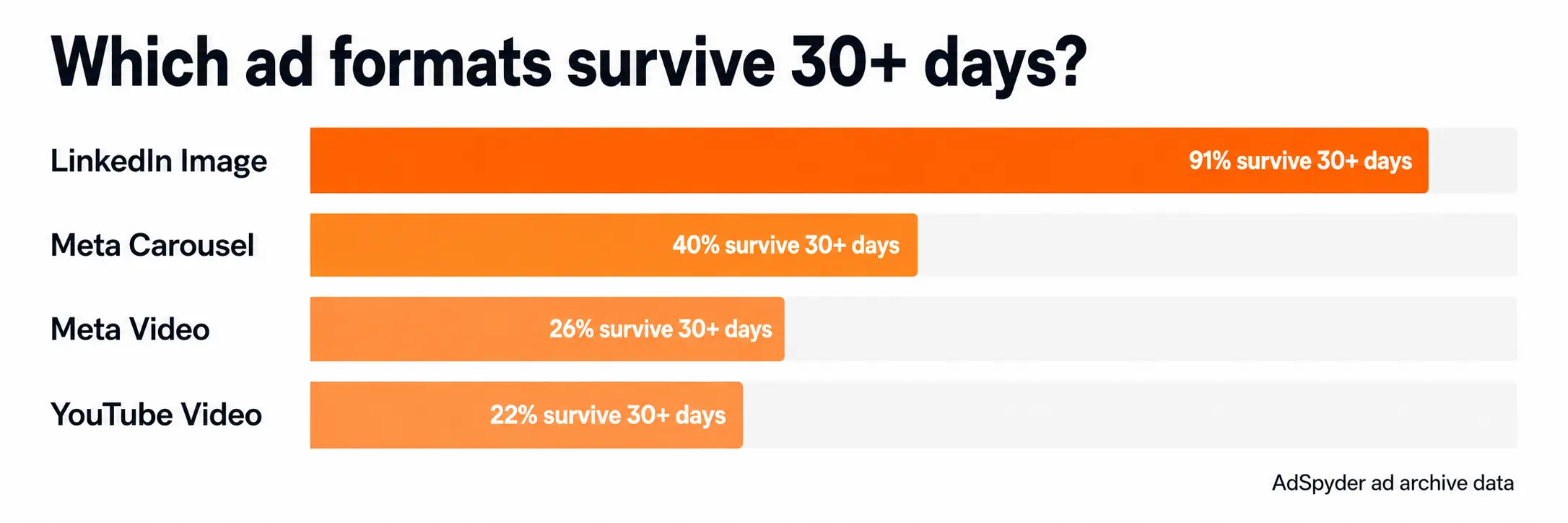
An ad running for 30+ days almost certainly performed well enough to justify the spend. Advertisers kill what doesn’t work fast — especially on Meta and Google where feedback loops are measured in days. An ad that survives a month is a winner by revealed preference. Here is what survival rates look like across AdSpyder’s archive by platform and format:
| Platform & Format | Median Run | Survive 30+ Days |
|---|---|---|
| LinkedIn — Image | 57 days | 91.1% |
| Meta Real-Time — Carousel | 17 days | 39.9% |
| LinkedIn — Video | 21 days | 39.8% |
| Meta Real-Time — Video | 2 days | 26.2% |
| Meta Real-Time — Single Image | 2 days | 23.3% |
| YouTube — Video | 5 days | 22.1% |
| LinkedIn — Text Only | 0 days | 27.1% |
| Meta Historical — Image | 0 days | 8.0% |
Source: AdSpyder ad archive, per-platform format survival rates, May 2026. “Last-seen” = last date observed; duration is a floor, not the true lifetime.
Two things stand out. First, LinkedIn image ads are in a different category — 91.1% survival past 30 days, median 57 days. If your competitor has a LinkedIn image ad that’s been live for two months, that is high-confidence evidence the copy is working. Study the headline, the intro text, and the offer structure closely.
Second, on Meta’s live feed, carousel ads survive at 39.9% past 30 days — ahead of single images (23.3%) and video (26.2%). Carousel production takes more effort, so advertisers tend to invest in copy more carefully. The result: competitor carousel ads are often their most considered creative work.
💡 Practical filter rule
When researching competitor copy, filter for ads running 30+ days. Ignore anything newer than two weeks — it hasn’t proven itself yet. The 30-day mark is where “still running” becomes a meaningful signal.
The 5-Step Ad Library Copy Research Workflow
Run a CTA phrase search before anything else
Open AdSpyder’s Ad Library and search the core conversion phrase you’re trying to improve — “free trial”, “book a demo”, “get started free”, “shop now”. Don’t start with a competitor name. Start with the phrase. You’ll surface 20+ different approaches to the same conversion goal from across your category — different price points, different audiences, different creative executions. That’s your raw material before you write a single word.
Pull your top competitors by domain across all platforms
Search your competitor’s domain in AdSpyder. This pulls every ad that domain has run across all 10 platforms simultaneously — Google Search, Meta, YouTube, LinkedIn, TikTok, and more. You’re not just seeing their Meta ads. You’re seeing their complete paid advertising footprint. Across AdSpyder’s 8,663 user projects, 1,104 actively track competitor domains this way because it’s the most complete picture available from a single search.
Filter for ads running 30+ days — ignore recent launches
Sort results by first-seen date and prioritise ads with the longest observable run. An ad still live after 30 days has gone through at least one review cycle and survived. The copy inside a 60-day Meta carousel or a 90-day LinkedIn image ad has been confirmed by real advertiser spend. Pay particular attention to LinkedIn: image ads there survive 30+ days at 91.1% in our data — the highest rate of any format on any platform.
Break every ad into copy parts — button and body separately
For each ad you study, record two things independently: the platform CTA button (one of Meta’s ~25 fixed options), and the actual CTA language in the headline or body copy. The button is constrained — “Learn More” and “Shop Now” cover 56.5% of all Meta CTAs. The body is where real differentiation happens. Note the verb used, whether the offer is in the first sentence or the last, whether urgency is time-based or scarcity-based, and whether proof is quantified or qualitative.
Save to a project and build your copy decision file
Save the strongest ads to an AdSpyder project grouped by copy pattern — urgency offers, social-proof hooks, pain-point openers, feature-specific headlines. Before your next campaign build, open the project instead of starting from scratch. The goal is not a folder of screenshots. It’s a decision file: which hook to test, which CTA to use, which promise to lead with. AdSpyder users who research before generating AI ad copy review roughly 675 competitor ads before their first generation — not random scrolling, but deliberate pattern research. Source: AdSpyder platform data, May 2026.
What to Look For Platform by Platform
Each platform rewards different copy structures. Here is what to study in each one.
Google Search
100% text. Study headline 1 (the hook), headline 2 (the differentiator), and the description line. Competitors often put their strongest offer in H1 and their proof point in H2. 164M+ ads indexed.
Meta (Facebook & Instagram)
Focus on the first line of body copy — the hook before “see more”. Carousel ads are highest-signal (39.9% survival). 55M+ ads indexed, real-time and historical.
YouTube
Study the first 5 seconds of any skippable ad — that’s the hook model. A competitor’s ad that’s been in the archive for 90+ days has a proven opening. 2.4M+ ads indexed.
Image ads here survive longer than any format on any platform (91.1% past 30 days). The intro text — first ~150 characters — is where the copy battle is won. B2B competitors put ROI claims or role-specific pain points in line one. 1M+ ads indexed.
TikTok
The ad text above the video matters for click intent. Look at the text overlay language in the first 3 seconds of video for hook patterns. 3M+ ads indexed.
Amazon
Product title is the headline. Study whether competitors lead with benefit, feature, or use case. Typical campaigns run 5 ad variants (median); top campaigns run 20+. 21M+ ads indexed.
Free Native Ad Libraries vs AdSpyder
Native libraries are a good starting point. When the goal is to improve copy using competitor ads, here is where each falls short and where AdSpyder fills the gap.
| Research Need | Meta Ad Library | Google Transparency | AdSpyder |
|---|---|---|---|
| Platforms covered | Meta only | Google only | 10 platforms |
| Search by CTA phrase | ✗ | ✗ | ✓ |
| Historical ad archive | Active ads only | Active ads only | Back to 2008 |
| Total ads indexed | Limited | Limited | 400M+ |
| Search by competitor domain | Page name only | Limited | ✓ |
| Cross-platform view | ✗ | ✗ | ✓ |
| Save ads to projects | ✗ | ✗ | ✓ |
Mistakes to Avoid When Using an Ad Library for Copy Research
Copying exact wording
Study the structure, not the words. Direct copying weakens trust, creates compliance exposure, and produces an ad that reads like every other ad in your category.
Researching only Meta
A competitor’s Google Search headlines and LinkedIn intro text reveal messaging strategy that Meta ads often don’t. Different platforms, different audience intent, different copy angles from the same brand.
Saving ads without notes
A saved ad is not useful without a label. Record the hook type, offer structure, CTA language, proof point, and why it matters before closing the tab.
Treating new ads as proven
A one-week-old ad hasn’t proven anything. Focus on ads that have survived 30+ days. Longevity is the only performance signal available in an ad library without spend data.
Pre-Campaign Copy Research Checklist
☐
Searched your primary CTA phrase (“free trial” / “book a demo” / “shop now”) in the ad library before opening your copy doc
☐
Pulled your top 3 competitors by domain to see their cross-platform ad output, not just Meta
☐
Filtered for ads running 30+ days and shortlisted 5–10 for copy study
☐
Documented the CTA button AND body copy CTA separately for each ad studied
☐
Noted the hook type for the top 3 long-running ads: pain-point, curiosity, offer, social proof, or feature
☐
Checked the same competitor on Google Search and Meta — are they using the same message on both platforms or different angles?
☐
Saved the strongest ads to an AdSpyder project before starting your copy draft
☐
Identified one copy pattern your competitors use consistently that you currently don’t
☐
Rewrote every insight in your own brand voice — no direct copies from competitor ads
Remember: An ad library shows what is running, not what is converting. Longevity is the best signal available without spend data — but it’s a clue, not proof. Use it to prioritise what to study, not to confirm winners without testing.
400M+ ads. 10 platforms. One search bar.
Search by CTA phrase, competitor domain, or keyword. Find what’s running — and what’s been running for months.
Frequently Asked Questions
What is an ad library?
An ad library is a searchable archive of ads running across one or more platforms. Native libraries from Meta, Google, and TikTok exist but are platform-siloed and show only currently active ads. AdSpyder’s Ad Library indexes 400M+ ads across 10 platforms — Google, Meta, YouTube, LinkedIn, TikTok, Amazon, Bing, Display, Twitter, and Instagram — going back to 2008.
Is the Facebook Ad Library enough for copy research?
For Meta-only research, yes. But your competitors almost certainly run ads on Google Search, YouTube, and LinkedIn too — often with very different messaging tuned to each platform’s audience intent. A Meta-only view gives you a partial picture. Cross-platform research gives you the full competitive map.
How do I find a competitor’s best-performing ads without their data?
Use ad longevity as your proxy. An ad running for 30+ days was kept alive because the advertiser was satisfied with results. That’s as close to “this worked” as an ad library can get without showing actual spend or CTR data. Filter for the longest-running ads rather than the newest.
What CTA phrases should I search in an ad library?
Start with your primary conversion goal phrase. SaaS products: “free trial”. Ecommerce: “shop now”. Services: “book a demo” or “get a quote”. Once you’ve studied the category-wide pattern, narrow to specific competitors by domain. The phrase search comes first; the brand search refines it.
Can I use ad library research with AI ad generation?
Yes, and it produces better results. AdSpyder data shows that users who researched competitor ads before generating AI copy reviewed roughly 675 competitor ads before their first generation. That research gives the AI real context — specific hooks, offers, and proof structures from the market — instead of a generic prompt. The workflow is: research first, generate second.
Does AdSpyder have a free ad library?
Yes. AdSpyder’s Ad Library is searchable and indexes 400M+ ads across 10 platforms. You can also explore platform-specific libraries: Instagram, Bing, Display, Twitter/X, and Google Shopping.