Quick Answer
Winning Google Shopping product titles follow one formula: [Brand] + [Product/Model] + [Key variant — size, color, capacity, or material], in 50–100 characters, leading with the product (not the store name), with zero discount language. AdSpyder’s analysis of 94 million+ Shopping ads confirms this — and shows that ads running 30+ days lean even harder into spec detail than short-lived ones. See what your competitors’ longest-running titles look like using AdSpyder’s Shopping Ads Spy. Source: AdSpyder platform data, May 2026.
Most advice on Google Shopping titles tells you the same things: put the brand first, add color and size, stay under 150 characters. It’s all correct. And yet your titles still underperform against competitors whose titles look nearly identical to yours.
The missing piece isn’t a checklist — it’s a pattern. And you find it by looking at what’s actually surviving in the market, not what the guides say you should do.
This blog is built on AdSpyder’s analysis of 94 million+ Google Shopping ads (2018–2026 archive). We looked at title length distribution, structural patterns, which signals appear in long-running vs short-lived ads, and the exact vocabulary that dominates the titles that stick. You’ll get the data and a step-by-step workflow to apply it.
In This Article
The Length Sweet Spot: 50–100 Characters
2,000-ad random sample from AdSpyder’s Google Shopping archive (94.99M ads, 2018–2026) · May 2026
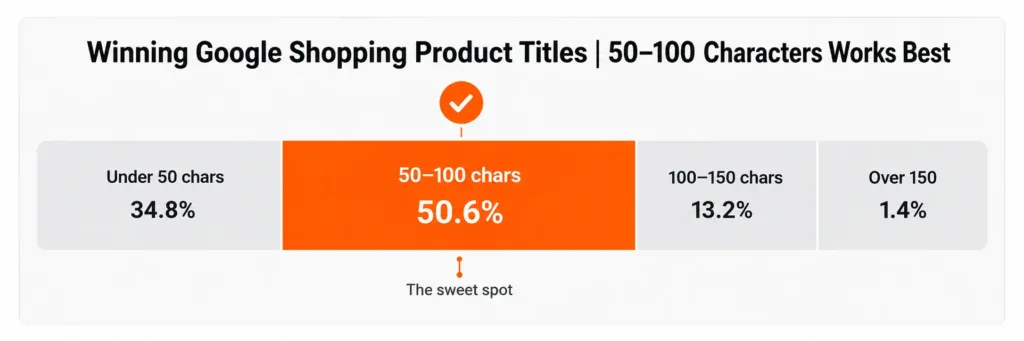
The “keep it under 150 characters” advice is technically correct but not useful. The real picture from AdSpyder’s archive is more specific.
50.6%
of titles are 50–100 characters
the most common length bucket
65 chars
average title length
median 58 chars, ~11 words
~15%
exceed 100 characters
most aren’t going long
Source: AdSpyder platform data, May 2026. Google Shopping archive — 2,000-ad random sample.
| Title length | % of Shopping ads | What this usually means |
|---|---|---|
| Under 50 characters | 34.8% | Missing brand, model, or variant detail |
| 50–100 characters ✓ | 50.6% | The sweet spot — brand + model + variant fits here |
| 100–150 characters | 13.2% | Often padding or multiple variants crammed in |
| Over 150 characters | 1.4% | Rare — usually keyword-stuffed feed exports |
Source: AdSpyder platform data, May 2026.
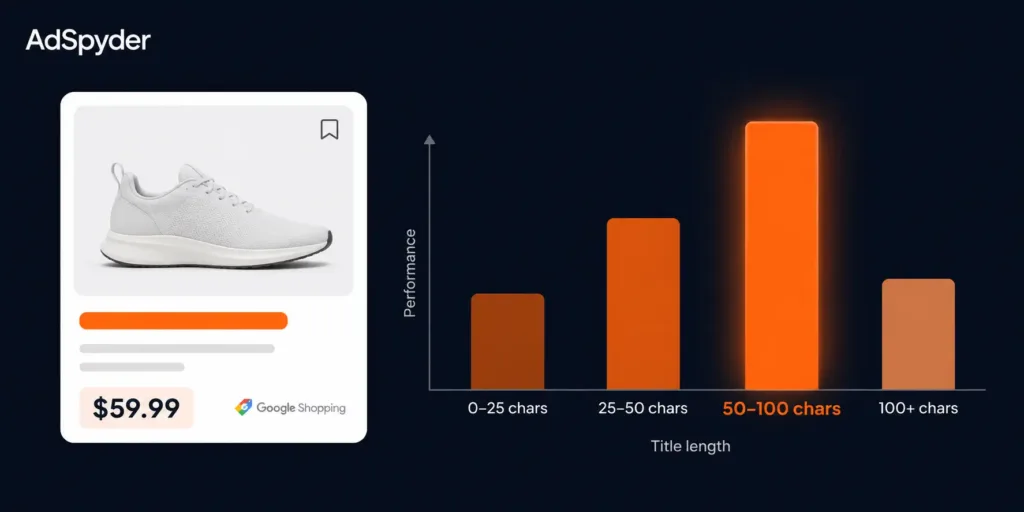
The 50–100 character range is where the market has settled. It’s long enough to fit brand, model, and one key variant — which is what Google needs to match your product to relevant queries. Going shorter usually means leaving out variant detail. Going longer rarely helps and risks truncation in the carousel.
Practical note
Google displays roughly 70 characters in most carousel placements. If your title runs 50–100 chars, keep brand, model, and key variant in the first 70 — not appended at the end where they get cut.
What Title Patterns Actually Win — And What Definitely Don’t
Signal prevalence across 2,000-ad sample · AdSpyder Google Shopping archive, May 2026
Three structural signals define the archive. Two confirm what experienced PPC managers already suspect. One will probably surprise you.
44.8%
contain a size or variant term
the single most common structural feature
0.1%
use discount or offer language
“sale”, “% off”, “deal” — almost nonexistent
15%
lead with retailer name
already a minority — and long-runners do it even less
Source: AdSpyder platform data, May 2026. Google Shopping archive — 2,000-ad random sample.
Nearly half of all titles anchor on a size or variant term. A color (black, white, blue), a size descriptor (S/M/L, size 10, “one size”), a pack count, a material (stainless steel, leather), dimensions (ml, mm, cm), or a model identifier. This is the single most common structural feature because Google Shopping is a filter-first experience — shoppers narrow by color, size, and material before they look at titles. A title that doesn’t name the variant leaves Google guessing.
The surprising finding: discount language is essentially absent. Only 0.1% of Shopping titles contain “sale”, “% off”, “deal”, or similar — and just 1.2% include a price in the title text. Compare that to search and social ad copy, where offer language is common. Shopping titles are spec sheets, not sales pitches. Price and promotion live in dedicated feed fields that Google surfaces separately. Putting “SALE 40% OFF” in your title just wastes the characters you needed for a variant term.
Leading with your store name is already a minority move — and the longevity data makes the case against it even sharper. 15% of titles start with the retailer name. When you front-load the store, you’re burning your most-scanned characters on information the shopper didn’t ask for. The next section shows exactly what happens to those titles over time.
See what your competitors’ titles look like right now
94 million+ Google Shopping ads. Filter by category, longevity, or competitor domain.
Long-Running vs Short-Lived: How Title Patterns Differ
288 ads running 30+ days vs 1,600 under 7 days · AdSpyder Google Shopping archive, May 2026
AdSpyder tracks the first-seen and last-seen date of every ad. That lets us ask directly: do the ads that run longest use different title patterns than the ones that disappear quickly? The answer is yes — and the differences point in a consistent direction.
| Title signal | Ads running 30+ days (n=288) | Ads gone <7 days (n=1,600) | Takeaway |
|---|---|---|---|
| Contains size/variant term | 46.9% | 44.2% | Long-runners lean harder into specs |
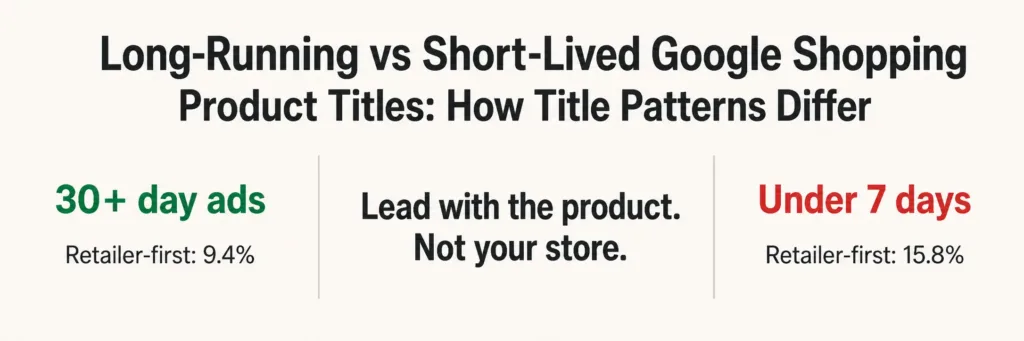
| Leads with retailer name | 9.4% | 15.8% | Store-first is more common in short-lived ads |
| Contains discount/offer language | 0.0% | 0.1% | Zero long-runners use discount language |
| Average character length | 63.6 chars | 65.6 chars | Nearly identical — length is not the differentiator |
Source: AdSpyder platform data, May 2026. Google Shopping archive — longevity comparison from 2,000-ad sample.
The retailer-name-first gap is the most actionable finding. Long-running ads lead with the store name only 9.4% of the time — vs 15.8% for short-lived ads. That 6.4 percentage point delta tells you something clear: the titles that stick are product-first, not store-first.
Title length is almost identical between the two groups. If you’ve been optimizing purely for character count, that’s not the lever. It’s what you put in those characters — specifically, whether the first tokens signal the product and its variant, or your store name.
Directional support from Bing Shopping
A separate 2026 AdSpyder pilot dataset from the Bing Shopping archive (21k ads with continuous date tracking) shows the same direction, more sharply: long-running ads have titles averaging 60.5 chars vs 43.1 for short-lived — 53% more size/variant terms, and retailer-first titles appearing 3.6× less often. Different platform, same pattern.
The Words That Dominate Google Shopping Titles
N-gram analysis from 2,000-title sample · AdSpyder Google Shopping archive, May 2026 — treat ranking as directional
The most common words in Shopping titles (after removing stopwords) are not product features or benefits. They are variant and spec anchors.
Top single words — AdSpyder 2,000-ad sample, May 2026
size
white
women
men
set
blue
pro
kit
red
pack
leather
led
iphone
nike
grey
gold
pink
Source: AdSpyder platform data, May 2026. Counts from 2,000-title sample — treat as directional ranking, not precise frequencies.
The top two-word phrases are brand+model or material+descriptor combinations: “one size,” “samsung galaxy,” “stainless steel,” “black size,” “intel core,” “long sleeve,” “apple iphone.” And the top three-word phrases show the winning architecture in its clearest form: “intel core i7,” “apple iphone 11 pro,” “nike air max,” “polo ralph lauren,” “14k yellow gold.” Every one of them is brand + model + spec.
What is not in this list: “amazing,” “best,” “quality,” “affordable,” or any claim language. Shopping titles are classification, not persuasion. Google is trying to understand what your product is so it can match it to the right search. The titles that win give it the cleanest signal possible.
Three title archetypes from the data
Apparel
“Women’s Black Long Sleeve Midi Dress — One Size”
Gender + color + style + garment type + size. All the filter terms a shopper uses to narrow results.
Electronics
“Apple iPhone 11 Pro 256GB Space Gray Unlocked”
Brand + model + capacity + color + key status. Every purchase-decision variable in the title.
Branded Fashion
“Nike Air Max 270 Men’s Running Shoe Black Size 10”
Brand + product line + gender + type + color + size. Nothing wasted, everything searchable.
The Winning Title Formula — Backed by 94M+ Ads
Synthesized from AdSpyder Google Shopping archive analysis, May 2026
Every data point converges on the same structure:
[Brand] + [Product type / Model name] + [Key variant: size, color, capacity, or material] → 50–100 characters, product-first, no discount language
Every element is data-backed: the 50–100 character target reflects where 50.6% of all titles sit. The variant requirement comes from the 44.8%–46.9% rate in long-running ads. Product-first comes from the 9.4% vs 15.8% retailer-first delta. No discount language reflects the 0.0% rate in long-runners.
| ❌ Weak title | What’s wrong | ✅ Improved title |
|---|---|---|
| Running Shoes | No brand, no variant, too short | Nike Men’s Air Zoom Pegasus 40 Running Shoes Black Size 10 |
| BestStore — SALE 50% OFF Waterproof Jacket | Store-first, discount in title | Columbia Men’s Watertight II Waterproof Jacket Navy Blue L |
| High Quality Stainless Steel Coffee Mug Set Premium Gift | No brand, filler adjectives, no capacity | Contigo Stainless Steel Travel Mug 16oz Black — Set of 2 |
| Laptop Intel Core | No brand, incomplete spec, under 25 chars | Dell XPS 15 Laptop Intel Core i7 16GB RAM 512GB SSD Silver |
Examples are illustrative, built from n-gram patterns in the AdSpyder archive.
How to Use AdSpyder Shopping Ads Spy to Find Winning Titles
A repeatable workflow for e-commerce brands, Amazon sellers, and PPC managers
The formula above gives you structure. What it can’t give you is the specific vocabulary your competitors are using for your category right now. That’s what AdSpyder’s Shopping Ads Spy is for.
Search by category or competitor domain
Go to adspyder.io/shopping-ads-spy and type a product category keyword (“running shoes”, “stainless steel mug”) or paste a competitor’s domain. You’re pulling from 94M+ Shopping ads across 100+ countries.
Filter for longevity — isolate the survivors
Use the duration filter to show only ads running 30+ days. These are the titles advertisers kept paying for — the strongest proxy for “this is working” that ad-library data can give you. Short-lived ads are experiments. Long-running ads are the signal.
Read the title structure — find the shared pattern
Look at the top 15–20 long-running titles in your category. Which words come first? Which specs appear in every title? What does your category use instead of “size” — is it “ml”, “cm”, “lb”, “pack of”? This is the vocabulary Google has learned to associate with your product type.
Rebuild your titles using the formula
Take the category vocabulary you found and apply the formula: [Brand] + [Product/Model] + [Key variant from your category], in 50–100 chars, product-first. No store name in position 1. No “sale” or “% off”. No filler adjectives like “premium” or “high quality” that the long-running titles in your category don’t use either.
Monitor — titles shift, and so should you
Competitors update their titles. New products enter your category. Set up a tracking project in AdSpyder’s Ad Library for your top 3–5 competitors and review quarterly. AdSpyder users are currently tracking 3,687 competitors across 1,104 active projects — competitor title research is already a standard workflow for serious PPC managers (AdSpyder platform data, May 2026).
Pre-Publish Checklist for Every Shopping Title
Frequently Asked Questions
See exactly what your competitors’ longest-running Shopping titles look like
The AdSpyder Shopping Ads Spy indexes 94 million+ Google Shopping ads across 100+ countries. Filter by category, longevity, or competitor domain — and find the title formula already working in your market.
23,000+ registered users · 10 platforms · 100+ countries · AdSpyder platform data, May 2026
Data source: AdSpyder Google Shopping ads archive — 94.99M ads, first-seen dates 2018–2026. Title analysis based on a 2,000-ad random sample (random-score sampling, deduplicated by doc ID). Longevity comparison: 288 ads with observable run of 30+ days vs 1,600 ads under 7 days, within the same sample. N-gram counts are from the 2,000-title sample and should be treated as directional rankings, not precise full-archive frequencies. All figures: AdSpyder platform data, May 2026.