
Run the right ads at the right time
Choose an optimisation goal, analyze past performance by day and hour, get a heatmap, and apply an AI-generated schedule in one click.
Goal-based
Maximize conversions, clicks, impressions, or reduce CPC.
Visual
Clear time-of-day and day-of-week heatmap.
Actionable
Apply recommended schedule or adjust manually.
Mini schedule preview
AI suggests active: 6h • paused: 18h
Trusted by 5,000+ marketers






Turn raw time-of-day data into a smarter ad schedule
The Day Time Optimisation Agent studies your performance across days and hours, finds the best and worst time slots for your chosen goal, and turns that into a recommended schedule.
How it works
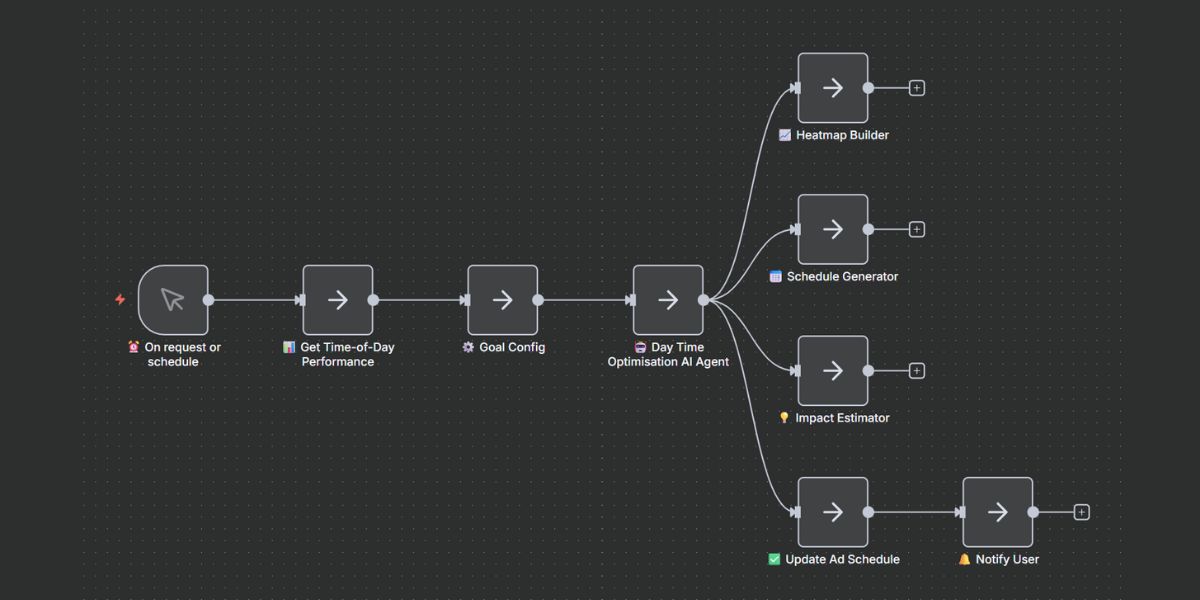
Inputs & definitions
Full control over how the agent analyzes and schedules your ads
Output preview
Visualize performance patterns and apply optimized schedules instantly
Interactive performance heatmap
Hover over any time slot to see detailed metrics. Green = high performance, Yellow = medium, Red = low.
Stay aligned with changing user behavior
Get notified when performance patterns shift
Alert triggers
Patterns shifting significantly
Alert when peak hours change or performance patterns shift from historical baseline
Schedule refresh due
Notify when it's time to re-analyze and update your schedule based on new data
Big CPC changes by hour
Get alerts when cost-per-click spikes or drops significantly during specific time slots
Notification channels
Receive alerts in your inbox
Slack
Get notified in your workspace
In-app
View alerts in your dashboard
Webhook
Send to custom endpoints
Alert frequency
Choose instant alerts for urgent pattern shifts, daily digests for regular updates, or weekly summaries for high-level trends.
Use cases
How marketers use the Day Time Optimisation Agent
Lower CPC by avoiding bad time slots
Reduce wasted spend during low-performing hours
Identify and pause or reduce bids during hours when your CPC is high but conversions are low. The agent automatically finds these slots and recommends schedule adjustments to reduce overall cost per acquisition.
Increase conversions by doubling down on peak hours
Amplify performance during high-converting times
Find your golden hours—when conversion rates spike and CPA drops. Apply increased bid modifiers during these windows to capture more volume while performance is strong, maximizing your return on ad spend.
Adapt to seasonality and behaviour shifts automatically
Let schedules evolve with your audience
Consumer behavior changes seasonally and over time. Schedule the agent to re-analyze periodically and auto-update your ad schedule, ensuring you're always aligned with current user patterns without manual intervention.
"We were running ads 24/7 and didn't realize how much budget we were wasting after 9 PM. The Day Time Optimisation Agent showed us clear patterns—our conversions dropped 70% in late evenings. We adjusted our schedule and cut CPA by 28% overnight."
Amanda Foster
VP of Marketing, E-commerce Brand
Frequently asked questions
Everything you need to know about Day Time Optimisation
Related AI agents
Complete your PPC optimization stack
Search Term Optimisation AI Agent
Filter search terms by performance, promote winners to keywords, add negatives automatically.
Schedules are applied through your ad platform integrations with your permission. You stay in control of all changes.
Compliance & Privacy
Schedules are applied through your ad platform integrations with your permission. You stay in control of all changes. Your performance data is processed securely and never shared with third parties.
Let your schedule adapt itself
Stop guessing which hours work. Let the AI analyze, visualize, and optimize your ad schedule automatically.
No credit card required • 14-day money-back guarantee • Setup in under 2 minutes